Anmelden
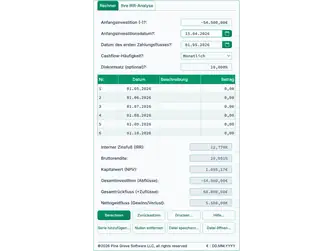
Screenshot der Ultimate Financial Calculator‑Oberfläche

Ultimate Financial Calculator – Werbebereich

Wählen Sie Ihre Farben:

IRR‑Rechner

Interner Zinsfuß

What is an Internal Rate of Return (IRR) calculation?

IRR‑Rechner
IRR‑Rechner

This IRR calculator calculates an annualized rate-of-return plus profit (loss).

  • Supports dated cash flows
  • Easy bulk data entry
  • Save entries to a file for later recall
  • Know your rate of return across multiple accounts and investments

Answers the question: “How am I doing?”

The Internal Rate of Return (IRR) is the annualized rate of return on an investment. It is calculated from the amounts and dates of the cash flows. It does not require an externally specified interest rate. For this reason, it is called “internal.” This calculator uses the Newton–Raphson method to compute the IRR.

An Internal Rate of Return (IRR) calculator computes the investment outcome. The results let you compare two or more investment options on a consistent basis.

This calculator determines the IRR for a complex series of cash flows. It also reports the total invested amount, the total returned amount, and the profit (or loss). The calculator supports both irregular time periods and exact date data entry.

The frequency option defines regular cash flows, such as daily, monthly, or quarterly payments. There are 11 frequency choices.

Review the usage tips below (click to scroll). …

The Calculator-Calculate the Internal-Rate-of-Return for an Irregular Cash Flow


©2026 Pine Grove Software LLC, Alle Rechte vorbehalten
$ : MM/DD/YYYY
Klicken Sie, um kleiner (-) oder größer (+) zu machen.
Ziehen & Ablegen Sie hier Ihre gespeicherten Dateien, um sie zu laden.

  • Jan. 28, 2025: You can now use copy/paste (Ctrl-C/Ctrl-V [Cmd-C/Cmd-V on a Mac]) to copy and paste a value from one cell to another cell.

Why is the IRR useful?

The Internal Rate of Return (IRR) converts uneven project cash flows into a single annualized rate of return. It lets investors compare opportunities on a consistent basis. Because the IRR reflects both the amounts and the timing of cash flows, it standardizes results across investments that have different patterns of outlays and receipts.

For example, consider two rental properties for sale. The asking prices are approximately the same, and the projected rents are also approximately the same. One property requires a higher initial renovation cost. The other has higher property taxes. How can an investor determine which purchase is the better investment?

An investor can use an IRR calculator to make this comparison.

Caution: Do not compare internal rates of return calculated with different calculators.

Why is this important?

Two different calculators may compute results slightly differently, and neither calculator is necessarily incorrect. For example, Microsoft Excel includes two IRR functions that may return different results for the same cash flows. Users do not need to focus on this point, but they should be aware of it when interpreting results.

For the record, this calculator determines the IRR by using the Newton–Raphson method and counting days (some calculators instead count periods).

To try a calculator that applies a different IRR algorithm, use this site’s Annual Percentage Rate (APR) calculator. The APR calculator follows the method specified in the Truth-in-Lending Act for calculating APR, which is a form of IRR.

  • Zero amounts do not affect the IRR. For example, if the frequency is “Monthly,” and there are only four cash flows in a year, leave the remaining eight at 0. The same applies to 0 amounts after you enter the final liquidation value.
  • Enter the investment’s current or final value as the last cash flow. If you are calculating the IRR for a stock or mutual fund and you still own the investment, enter the investment’s current value as the last amount.
  • You do not need to enter cash flows in date order. The calculator sorts them before calculating the result. This feature is convenient if you realize that you missed a cash flow. In that case, enter the amount in any available cell, change the date for that cell, and then click Calc to sort.
  • If you mistakenly duplicate a cash flow, set one of the duplicates to “0.”
  • Changing First Cash Flow Date resets the dates without clearing the values you have entered.
  • Depending on the order in which you use First Cash Flow Date, Remove 0’s, and Add Series, the First Cash Flow Date may not be the first date in the input area. This is not an error. Changing First Cash Flow Date initializes a series that begins on the selected date. However, you can change the date, or Remove 0’s can remove the date if the value for the start date is 0. Finally, you can insert a series with a date that occurs before First Cash Flow Date.
  • Calendar Tip: When using the calendar, click the month at the top to list months. If needed, click the year at the top to list years. Click to select a year, then select a month, and then select a day. You can also scroll through the months and days. Or, click Today to select the current date.
  • If you prefer not to use the calendar, click a date once or use the Tab key (or Shift+Tab) to select a date. Then type eight digits only—there is no need to type the separators. Because the date is already selected, you do not need to clear the prior date before typing. For example, if your selected date format is mm/dd/yyyy, then for August 1, 2025, type 08012025.
  • Important reminder: You do not need to enter the cash flows in date order. The calculator sorts them after you click the Calc button.

An important reminder about IRR calculators

Different IRR calculators may use different algorithms to determine the rate of return. There is no single formula for calculating IRR. Do not compare the IRR result for one investment from one calculator with the IRR result for another investment from a different calculator. Always use the same calculator when you compare multiple investments.

Internal Rate of Return—IRR Equations

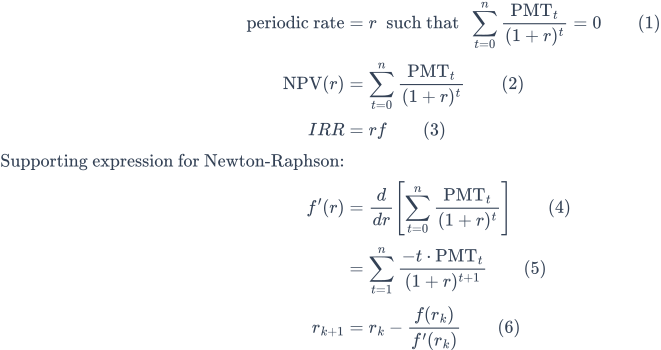
IRR‑Gleichung
Fig. 1—Internal Rate of Return equation. Source:Wikipedia, lizenziert unterCC BY-SA 4.0.
Step-by-step solution of the IRR equation

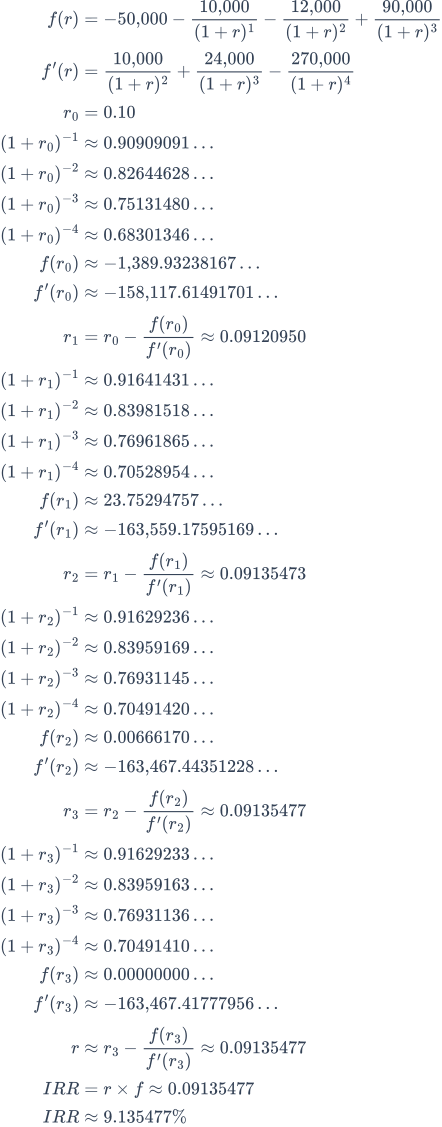
Fig. 2—Step-by-step solution of the IRR equation.

Variables: PMT0 = −50,000;  PMT1 = −10,000;  PMT2 = −12,000;  PMT3 = 90,000;  n = 3;  f = 1.

Variablendefinitionen

r
Periodic rate of return. For example, per year when cash flows are annual.
IRR
Nominale annualisierte Rendite, berechnet als IRR = r × f.
f
Frequency (the number of periods per year). For annual spacing, f = 1.
PMT
Cash flow at period index t. By convention, outflows are negative and inflows are positive. Values may differ across periods.
n
Gesamtzahl der Perioden nach t = 0. Die Summation von t = 0 bis t = n umfasst sowohl den anfänglichen Cashflow bei t = 0 als auch den finalen Cashflow bei t = n.
t
Period index. An integer with t = 0, 1, …, n, measured in equal time steps. (The calculator does not require cash flows to be equally spaced.)
How do you calculate the IRR?

To calculate the Internal Rate of Return (IRR), solve for the interest rate that makes the Net Present Value (NPV) of a series of cash flows equal to zero. Because the IRR equation is nonlinear, it is usually solved using an iterative method such as Newton–Raphson.

Detailed Explanation

The IRR equation is nonlinear and cannot be solved algebraically. To find the rate r that makes NPV equal to zero, treat the problem as a root-finding problem. This means solving the following equation:

f(r) = ∑t=0n PMTt ÷ (1 + r)t

We want the value of r such that f(r) = 0. This calculator applies the Newton–Raphson method to find this value. The method starts with an initial estimate and refines that estimate using both the value and the slope (derivative) of the function at that point.

The slope is the derivative of f(r), denoted f’(r), which shows how sensitive the NPV is to changes in r. It is computed as:

f’(r) = ∑t=1n −t × PMTt ÷ (1 + r)t+1

The Newton–Raphson update formula is:

rk+1 = rk − f(rk) ÷ f’(rk)

Each iteration produces a value that is closer to the IRR. This process is illustrated in Fig. 2, which shows the calculation using sample cash flows.

Calculation Steps Explained—Fig. 2.

What is the IRR for the cash flows −50,000 (investment), −10,000, −12,000, +90,000 (returned), with each cash flow one year apart?

Solve for the periodic IRR by setting the Net Present Value (NPV) to zero and defining f(r) as the sum of discounted cash flows and f’(r) as its derivative. Then apply Newton–Raphson updates (Equation (6)) until f(r) converges to zero.

  1. Define the NPV function f(r) from Equation (2):
    f(r) = −50,000 − 10,000 ÷ (1 + r)^1 − 12,000 ÷ (1 + r)^2 + 90,000 ÷ (1 + r)^3
  2. Apply the general derivative rule (Equation (5)) to compute f’(r):
    f’(r) = 10,000 ÷ (1 + r)^2 + 24,000 ÷ (1 + r)^3 − 270,000 ÷ (1 + r)^4(Each term follows the pattern −t × PMT_t ÷ (1 + r)^(t+1).)
  3. Choose an initial guess for the periodic rate: r₀ = 0.10.
  4. Compute discount factors at r₀ (first iteration shown in full):
    (1 + r₀) = 1.10 (1 + r₀)^−1 = 1 ÷ 1.10 ≈ 0.90909091 (1 + r₀)^−2 = 1 ÷ (1.10)^2 ≈ 0.82644628 (1 + r₀)^−3 = 1 ÷ (1.10)^3 ≈ 0.75131480 (1 + r₀)^−4 = 1 ÷ (1.10)^4 ≈ 0.68301346
  5. Evaluate f(r₀) using Equation (2):
    f(r₀) = −50,000 + [−10,000 × 0.90909091] + [−12,000 × 0.82644628] + [90,000 × 0.75131480] ≈ −50,000 − 9,090.90910 − 9,917.35536 + 67,618.33200 ≈ −1,389.93238167

    Result: f(r₀) ≈ −1,389.93238167

  6. Evaluate f’(r₀) using Equation (5) (term by term):
    1. t = 1, PMT₁ = −10,000:
      −1 × (−10,000) ÷ (1 + r₀)^2 = +10,000 × (1 + r₀)^−2 ≈ 10,000 × 0.82644628
    2. t = 2, PMT₂ = −12,000:
      −2 × (−12,000) ÷ (1 + r₀)^3 = +24,000 × (1 + r₀)^−3 ≈ 24,000 × 0.75131480
    3. t = 3, PMT₃ = +90,000:
      −3 × (+90,000) ÷ (1 + r₀)^4 = −270,000 × (1 + r₀)^−4 ≈ −270,000 × 0.68301346
    Sum: 10,000×0.82644628 + 24,000×0.75131480 − 270,000×0.68301346 ≈ −158,117.61491701

    Result: f’(r₀) ≈ −158,117.61491701

  7. Apply the Newton–Raphson update (Equation (6)):
    r₁ = r₀ − f(r₀) ÷ f’(r₀) = 0.10 − (−1,389.93238167) ÷ (−158,117.61491701) = 0.10 − 0.00879049676 ≈ 0.09120950
  8. Discount factors at r₁ (results only):
    (1 + r₁)^−1 ≈ 0.91641431
    (1 + r₁)^−2 ≈ 0.83981518
    (1 + r₁)^−3 ≈ 0.76961865
    (1 + r₁)^−4 ≈ 0.70528954
  9. Evaluate at r₁ (results only):
    f(r₁) ≈ 23.75294757
    f’(r₁) ≈ −163,559.17595169
  10. Update (results only):
    r₂ = r₁ − f(r₁) ÷ f’(r₁) ≈ 0.09135473
  11. Discount factors at r₂ (results only):
    (1 + r₂)^−1 ≈ 0.91629236
    (1 + r₂)^−2 ≈ 0.83959169
    (1 + r₂)^−3 ≈ 0.76931145
    (1 + r₂)^−4 ≈ 0.70491420
  12. Evaluate at r₂ (results only):
    f(r₂) ≈ 0.00666170
    f’(r₂) ≈ −163,467.44351228
  13. Update (results only):
    r₃ = r₂ − f(r₂) ÷ f’(r₂) ≈ 0.09135477
  14. Discount factors at r₃ (results only):
    (1 + r₃)^−1 ≈ 0.91629233
    (1 + r₃)^−2 ≈ 0.83959163
    (1 + r₃)^−3 ≈ 0.76931136
    (1 + r₃)^−4 ≈ 0.70491410
  15. Final convergence (results only):
    f(r₃) ≈ 0.00000000
    f’(r₃) ≈ −163,467.41777956
    r ≈ r₃ − f(r₃) ÷ f’(r₃) ≈ 0.09135477
  16. Annualize using frequency f = 1:
    IRR = r × f ≈ 0.09135477
    IRR ≈ 9.135477%

Thus, the periodic IRR is r ≈ 0.09135477, and, with annual spacing (f = 1), the internal rate of return is R ≈ 9.135477%.

Hinweise:

  • First iteration shown in full: Discount factors, function values, the derivative, and the update are expanded with explicit arithmetic. Later iterations show only results but follow the same structure.
  • f(rₖ) vs. f’(rₖ): f(rₖ) is the NPV at iteration k. f’(rₖ) is the slope (derivative) of the NPV with respect to r at that iteration and appears in the denominator of the Newton–Raphson update (Equation (6)).
  • Stopping criterion: Iteration stops when |f(rₖ)| is sufficiently close to zero so that another update would not materially change r.

Endergebnis

The final answer (IRR) is approximately 9.135%.

Validate the calculator. Three-year internal rate of return calculation.

Validate the calculator against the internal rate of return (IRR) equation.
Initial Investment:−50,000.00
Initial Investment Date:
First Cash Flow Date:
Cash Flow Frequency:Jährlich
Discount Rate (optional):0.0%
Investment cash flows used in internal rate of return (IRR) calculation.
Nr.DatumBeschreibungBetrag
1Additional investment−10,000.00
2Additional investment−12,000.00
3Investment return90,000.00
If any period includes February 29 (leap year), the result may differ slightly.

Calculated result:

The calculated result.
Internal Rate of Return (IRR):=9.135%

Hinweise:

  • Dieses Beispiel verwendet dieselbe Berechnung wie in Abb. 2 dargestellt.
  • The calculator computes an Extended Internal Rate of Return (equivalent to a spreadsheet’s XIRR function). Extended IRR offers greater flexibility and accuracy because cash flow entries use actual dates. A one-day difference can result in a slightly different (X)IRR.
advertisement

Comments, suggestions & questions welcomed...

Your email address is not published. I use it only to notify you of a reply.
Let me know if you have a website. I might like to visit it.
* Required

advertisement