How to Calculate a Mortgage or Loan Term
To select your preferred currency and date format, click the “$ : MM/DD/YYYY” link in the lower right corner of any calculator.
A Step-by-Step Tutorial
Tutorial 5
Calculate the loan term (total number of payments) for a conventional mortgage or loan when the regular payment amount is known. All financial calculators on this website can calculate the term of a cash flow. However, the Ultimate Financial Calculator can also calculate the term after a change in the payment or interest rate.
Before using this tutorial, complete the more detailed first tutorial to understand the core concepts and default settings of the Ultimate Financial Calculator (UFC).
To calculate an unknown loan term, follow these steps:
- Stellen Sie die Planungsart auf Darlehen ein.
- Alternatively, click to clear any existing data.
- Klicken Sie , dann wählen Sie .Set to Adjust last interest.
- Im Kopfbereich übernehmen Sie die folgenden Einstellungen:
- Für die Berechnungsmethode wählen Sie Normal.
- Stellen Sie die Anfangsaufzinsung auf Monatlich ein.
- Geben Sie 5,0 für den anfänglichen Zinssatz ein.
- Create a Loan series in row 1 of the cash-flow input area.
- Set the Date to September 1, 2026.
- Set the Amount to 50,000.00.
- Stellen Sie die Anzahl (der Perioden) auf 1 ein.
- Note: Because the number of periods is 1, you cannot select a frequency.
- Click the second row of the cash‑flow input area. Select “Payment” for “Series”.
- Set the Date to October 1, 2026, if it is not already set.
- Set the Amount to 600.00.
- This sets the regular payment to $600.00 per month until the loan balance reaches zero.
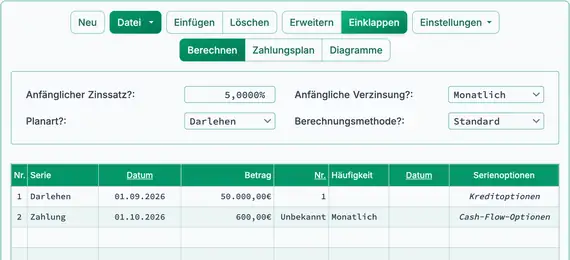
- Press Tab to move to Number (of Periods). Type U to set it to “Unknown”. See Fig. 1.
- Setzen Sie die Häufigkeit auf Monatlich.
Ihr Rechner sollte nun wie unten gezeigt erscheinen:
- Click . The result is 103. See Fig. 2.
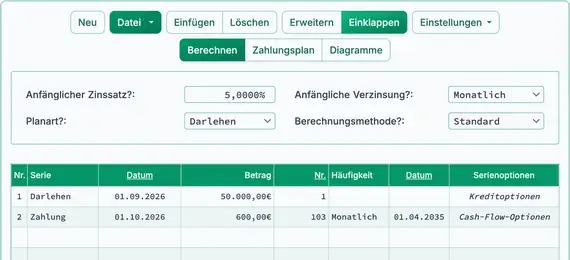
- To view a detailed amortization schedule that shows the monthly breakdown of principal and interest, click above the input area.
Hinweis: The number of periods must always be a whole number. If Number (of Periods) is set to unknown, the calculator returns an integer value only. This may result in a large rounding difference. If is set to Open Balance, the final balance may be slightly above or below zero.
If the loan is overpaid (ending balance is below zero), decrease the calculated Number (of Periods) by one. This will bring the balance above zero. If the balance is above zero, increase Number (of Periods) by one. This will bring the balance below zero. In either case, in , select Adjust last amount to reach “0” balance to ensure the loan is completely paid off. You are not required to use the exact calculated term. You may adjust the term and rounding settings to meet your specific requirements.
Variations: In some cases, the borrower selects the payment amount, and the lender specifies the term. Using the same inputs as above, the lender may accept a $600.00 monthly payment but require full repayment in eight years (96 payments). To do this, modify Step 5: set Number (of Periods) to 96. Then, in , select Adjust last amount to reach “0” balance.
In this variation, there is no unknown value. Click to view the schedule. Although the borrower makes $600.00 monthly payments, the final payment—required to repay the loan in eight years—will be $4,484.92. See Fig. 3.
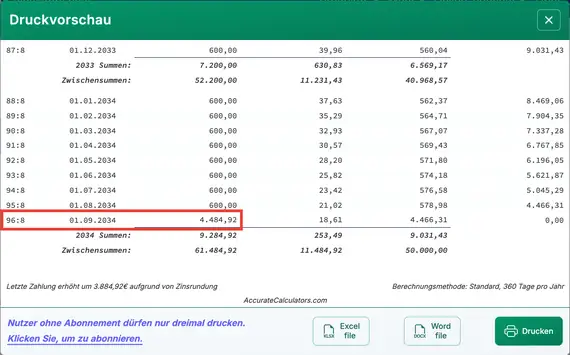
When calculating the term, the final period may include a rounding adjustment—especially if is not set to Open Balance. Because the payment and interest rate are fixed, the calculation may mathematically require a fractional period. However, loan schedules must use whole periods—such as 180 payments, not 180½. Therefore, the last payment amount may need to be adjusted. You may increase or decrease the calculated term to reduce the size of this adjustment.
Zurück zum Ultimate Financial Calculator.