
Accurate Balloon Payment Calculator
What is a balloon loan?

Balloon payment calculator solves for the periodic payment amount or final balloon payment amount. Create schedules with dates. Supports extra payments.
- Solves for 5 unknowns.
- Supports extra payments and user selectable dates.
- Creates a printable payment schedule.
- Now export to XLSX/DOCX files.
You can structure a loan to meet your specific needs.
Balloon loan—a light-sounding name for a financial product that can involve significant risk.
A balloon loan has its regular periodic payment calculated using one term (for example, 30 years), while the final payment is due earlier (for example, in 7 years).
Wikipedia defines a balloon loan or mortgage as a loan:
which does not fully amortize over the term of the note, thus leaving a balance due at maturity. The final payment is called a balloon payment because of its large size.
This Balloon Loan Calculator not only calculates the final balloon payment—it also helps you structure a loan to meet your specific needs.
Consider these common loan scenarios:
- If you want to know what periodic payment will result in a specific final balloon amount, this calculator will calculate the regular payment.
- If you need to set the regular payment to an agreed-upon, nontraditional amount before calculating the balloon, this calculator can do that as well.
- If you have a budget for both the periodic payment and the balloon payment and you want to know how much you can borrow, this calculator can use your inputs to calculate the loan amount.
- If you want to lower the periodic payment even further, you can select interest-only payments.
- If you want the periodic payment calculated using a 30-year term while the balloon is calculated using a 7-year term, you can do that calculation too. See “Doing the Two-Step” below…
The Calculator-Calculate the Periodic Payment, Final Balloon Amount, or Number of Payments
To set your preferred currency and date format, click the “$ : MM/DD/YYYY” link in the lower-right corner of any calculator.
Information
Using the Balloon Loan Calculator
Quickly
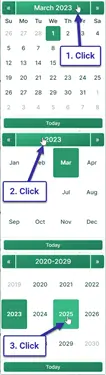
Pick a Date
As mentioned, a balloon loan is a loan that has its regular periodic payment calculated using one term (for example, 30 years) while the last payment is due sooner (for example, in 7 years).
If you do not know the amount of the regular loan payment, then we must calculate it before we calculate the final balloon amount.
Example: Assume you are considering a mortgage for $146,500. You want the monthly payment calculated based on a 30-year loan, but you will pay the balance after 72 months.
Doing the Two-Step
Step 1: Enter:
| Loan Amount?: | $145,500.00 |
| Annual Rate?: | 4.5000% |
| Balloon Due at Payment? (#): | 360 |
| Periodic Payment?: | $0.00 |
| Final/Balloon Payment (can be 0)?: | $0.00 |
When you enter “0” for both “Periodic Payment” and “Final/Balloon Payment,” you are setting up the calculator to calculate a level payment for the entire term of the loan. This means the final payment will not be a balloon payment.
Click “Calc” to see the results. $737 is the regular payment amount for a 30-year loan. (The final payment is rounded by less than $2.00, or less than $0.01 per regular payment.)
| Periodic Payment?: | $737.23 |
| Final/Balloon Payment (can be 0)?: | $735.27 |
Step 2: Now calculate the balloon payment amount. With the balloon due after six years, set the calculator as follows:
| Loan Amount?: | $145,500.00 |
| Annual Rate?: | 4.5000% |
| Balloon Due at Payment? (#): | 72 |
| Periodic Payment?: | $737.23 |
| Final/Balloon Payment (can be 0)?: | $0.00 |
Click “Calc,” and this is the balloon that will be due in the final month of the sixth year if the debtor makes payments based on an assumed 30-year term:
| Final/Balloon Payment (can be 0)?: | $130,433.50 |

If the goal is to know the balloon payment amount, then you are finished.
However, with this calculator, it is possible to do more. You can structure a loan the way you want.
Other scenarios — very flexible!
| Loan Amount?: | $145,500.00 |
| Annual Rate?: | 4.5000% |
| Balloon Due at Payment? (#): | 72 |
| Periodic Payment?: | $0.00 |
| Final/Balloon Payment (can be 0)?: | $100,000.00 |
| Result: | |
| Periodic Payment?: | $1,110.73 |
| Loan Amount?: | $145,500.00 |
| Annual Rate?: | 4.5000% |
| Balloon Due at Payment? (#): | 72 |
| Periodic Payment?: | $2,000.00 |
| Final/Balloon Payment (can be 0)?: | $0.00 |
| Result: | |
| Final/Balloon Payment (can be 0)?: | $27,541.94 |
| Loan Amount?: | $0.00 |
| Annual Rate?: | 4.5000% |
| Balloon Due at Payment? (#): | 72 |
| Periodic Payment?: | $1,000.00 |
| Final/Balloon Payment (can be 0)?: | $50,000.00 |
| Result: | |
| Loan Amount?: | $84,794.97 |
A Balloon Loan with Extra Payments
The calculator’s support for extra payments is very flexible. First, you will notice that the calculator prompts you for the “Extra Payments Start?” date. Therefore, you can schedule extra payments between the regular due dates if that timing is better for your cash flow.
As mentioned elsewhere, the calculator allows for a one-time extra payment or for multiple extra payments. The multiple extra payments can be for two payments or any number of payments until the loan is paid in full. (In that case, set the number of extra payments to “Unknown.”)
When the extra payments are “off-schedule,” the calculator prepares an expanded report. The report shows the extra payment applied 100% to principal while interest continues to accrue.

Note how the interest-only payment drops from $545 to $526 after the extra payment.
This is the correct way to apply the payment—something that other online calculators do not usually handle properly, if they allow extra payments between regular payments at all.
The Interest-Only Payment Method is a Special Case
Most frequently, the periodic payments are allocated to both principal and interest. With each payment, the loan balance is reduced.
But what if the borrower wants to pay even less per period?
In that case, the lender may agree to make the balloon loan one where the borrower pays only the interest due on each payment date. Paying only the interest each period reduces the payment amount even further for the borrower.

This calculator supports interest-only payments (select the option under “Amortization Method”). If you select this option, the calculator works slightly differently.
- First, the balloon payment will always be equal to the loan amount. Therefore, it is not possible to solve for the balloon payment.
- Viewed in a different way, the user cannot provide a periodic payment amount. The calculator will always calculate the regular payment amount, because it is the interest due.
- When you introduce extra payments into the interest-only cash flow, the calculator’s main window shows the amount of the first interest-only payment. After each prepaid principal amount, subsequent payments are reduced, because prepaying lowers the loan balance and therefore reduces the interest due.
Given the above, if you select interest-only, in almost all cases you will want to set both of these inputs to 0.
| Periodic Payment?: | $0.00 |
| Final/Balloon Payment (can be 0)?: | $0.00 |
Charts
Reviewing long columns of numbers can be difficult. Cash flow charts make it easier to see the relationship between principal, interest, and any extra payments.
This calculator creates three charts.

- The annual chart compares total interest and principal paid each year.
- The accumulated chart shows the amounts allocated to principal and interest since the start of the loan.
- The pie chart shows the relationship between total interest and principal with calculated percentages.
Bloggers can use these charts to illustrate their analysis. Click for several export options.
Should I take out a balloon loan? There is risk.
Balloon loans have advantages. The borrower can borrow a large amount for a short period while making relatively small periodic payments.
However, the borrower should consider this loan type only if they are confident that they will have the funds available or that they will be able to refinance the loan in time to make the balloon payment when it comes due. Otherwise, the borrower will very likely default on the terms of the loan and risk damaging their credit rating.
What do you think? Is a balloon loan a useful financial product? Or are you an issuer of these loans? If so, do you have anything to add to the above?
You can leave your comments and questions below.
Balloon Loan Calculation Help
You can calculate any one of five possible unknowns with this calculator. Enter 0 for exactly one of the following: “loan amount,” “annual rate,” “balloon due at payment number,” “periodic payment,” or “final/balloon payment.”
This makes it easy to solve for a periodic payment amount that results in a particular balloon payment. You can also solve for the balloon payment amount when you provide the regular payment amount.
If you are solving for the balloon payment and the periodic payment decreases as well, that indicates the periodic payment was larger than necessary given the other loan details.
Consider this extreme example:
If the loan amount is $100,000, the balloon is due at period 48, and the periodic payment is $10,000, there is no need for a 48th payment, and there is no need for a balloon payment. In this case, the loan would be paid off in 10 periods (not accounting for interest).
The calculator handles this scenario by recalculating and lowering the regular payment.
If you enter nonzero values for all five inputs, the calculator will recalculate the balloon amount that you provided.
Note: A balloon payment is not the same as the remaining balance of a loan. See the “Remaining Balance Calculator” if you need to calculate the loan balance after making a payment.
Dan says:
Have a 24 month balloon starting on 6/30/2022 amortized over 30 years with the first payment due 08/01/2022. The 23rd payment is due 06/01/2024. Why is the balloon not due until 07/31/2024?
Karl says:
The loan date, 6/30/2022, has no impact on when the balloon is due. The balloon (which is a payment, of course) is calculated from the first payment date, 8/01/2022. I assume you entered payment #24 for when you want the balloon due. That would be 7/01/2024.
But no worries. Did you need a schedule with a balloon payment paid on July 31, 2024? In that case, use the Ultimate Financial Calculator which allows users to set any payment, including a balloon payment, to be due on any date.
Look for the links to the tutorials. There are 2 tutorials/guides specifically about balloon loans.
Dan says:
Everything you stated was correct except the balloon date. It is automatically setting up the balloon payment for 7/31/24 instead of 7/1/24 charging the borrower internet for the entire month of July.
Dan says:
Everything you stated was correct except the balloon date. It is automatically setting up the balloon payment for 7/31/24 instead of 7/1/24 charging the borrower interest for the entire month of July.
Karl says:
I see now. I can’t duplicate what you are saying. That is, with the balloon being on 7/31/24. All the details are important. I guess the best thing to do if you want me to take a look is to copy and paste all your actual inputs into a reply to this message. To do that, you can select each tab on the calculator and select the text and inputs, and copy. But the schedule that I get, as I mentioned, shows the balloon due on 7/01/24.
Dan says:
It will not allow me to copy/paste into this comment box. If the closing date is set for either 6/29 or 6/30/22 it moves the balloon payment(payment #24) to 7/31/24. It should be on 7/1/24 because payment #23 is on 6/1/24. If we move the closing date to 7/1/22 the problem is corrected with the balloon due on 71/24.
Karl says:
The calculator on this page does not have a "closing date" option. Earlier, you had said that you had the "First Payment Due" set to August 1, 2022. First payment date is used to determine the balloon payment date.
I can think of one possible exception, and that is if your calculation also expects extra payments. Perhaps one extra payment goes past the balloon due date to make the balance 0?
Karl says:
Using the calculator defaults, I set the dates to this:
The schedule shows the final payment (balloon) on July 1, 2024.
But now, I see the problem. When I look at the schedule a second time, the date does change to July 31.
I’ll let you know when I fix this. In the mean time, for closing/loan dates on 30, 31, please always have a 0 for one unknown when clicking on the "Payment Schedule" button. Then it should produce the correct schedule.
Sorry that I made this a roundabout problem trying to figure out what is going on.
Dan says:
The loan date is the closing date. When set to 6/30/22 the balloon payment is due 7/31/24 instead of 7/1/24. The extra payment box is set to $0 and the balance is also $0 at payment #24. If the loan date is moved back a few days it sets the balloon date as 7/31/24. I have tried every option available to correct this with no luck.
Karl says:
Yeah, I realized that closing=loan the second I clicked reply. Duh!
Dan says:
Even with setting the number of extra payments to $0 instead of unknown it doesn’t change. Not sure what I should do as I cannot get it to show 71/24 as the balloon date
Karl says:
What I had to do to get the correct schedule after the first calculation was set the "Periodic Payment" back to $0.
Then set the 1st payment date to a date less then the 28th and click on the "Payment Schedule" button
Then again set the periodic payment to 0 and the 1st payment date to either the 29th or 30th as needed and click on the "Payment Schedule" button.
Karl says:
Dan, I fixed the issue with the dates. Thank you for letting me know, and sorry for the hassle.
If you do not see the fix, you may have to perform a hard refresh of the page:
Depending on your operating system all you need to do is the following key combination:
Above, from Refresh Your Cache.
Ruth Koltookian says:
How do I add more than one extra payment to the amortization schedule as they come in? They are not always for the same amount or the same day each month.I
Karl says:
Use this loan payoff calculator.
It allows users to track the payments as they are made – for any amount on any date.
Interest rates can be changed as well on any date (if you should need that too).
Blalock Walters PA says:
Question: I am doing a balloon loan with set monthly payment with an annual extra payment. It is a 5 yr balloon loan, $2500 monthly payment, $6000 annual payment to principal. The extra payment for the 4th year will not calculate or show up on the schedule. I set the # to unknown and to 4 and still will not put it in for year 4. Any assistance would be greatly appreciated.
Karl says:
Without the specifics (dates, amount of the extra payment, interest rate, etc.), I can’t say for sure why the calculator is not including an extra payment for the fourth year. However, since you know the number of extra payments you want/need, have you tried entering a number rather than "Unknown". If that still does not help, then please provide ALL the details. Details are important.
Blalock Walters PA says:
The loan amount is $545,000, interest rate 5.50, $2500 monthly fixed payment, $6000 annual starting 09/22/2024, 5 yr balloon, start date 09/22/2023, 1st payment due 10/22/2023. no points, round last payment to zero, amortized
Karl says:
Thank you for the details.
Since you didn’t mention when the balloon is due, I’m assuming that it is due at the end of the 5th year (i.e. period 60). The last payment of the 5th year is then Sept. 22, 2028.
If the extra payments start on Sept 22, 2024, AND the extra payments are not large enough to shorten the term due to principal prepayment, then the extra payments fall on:
Sept 22, 2024, Sept. 22, 2025, Sept. 22, 2026 and Sept. 22, 2027.
The Sept. 22, 2027 extra payment is missing. So I see what you mean. I’ll have to take a look at this.
In the meantime, I have two suggestions. The calculation "works" if that extra payments start on Sept. 21. That is, there will be an extra payment in 2027. But there will be some loss of accuracy since the extra payments are happening a day earlier that you are planning.
The other solution is to use the Ultimate Financial Calculator (link at the top of nearly all pages). I’ve created your schedule using the UFC and I’ll send you via email the details.
Blalock Walters PA says:
Thank you. Yes, it balloons on the 5th year. I was able to go to the mortgage loan calculator and was able to manipulate it…so the attorney is happy for now, but it is a true “balloon” and would like the schedule to show accordingly. If possible, please email Linda as she is working directly with the attorney and borrower. I’ll try the day before and see if that works. ty
Lisa Hadzima says:
How do I get the same/equal payment amounts for each month? I am trying to get a payment schedule for an interest-only balloon loan amortized over 30 years with the balloon payment at 3 years. I did step one (calculated interest only payments for 30 years) to get the periodic payment amount but even after I enter the specific periodic payment when I generate the payment schedule shows different amounts each month.
Karl says:
Since you didn’t tell me your setting/inputs, I can only guess.
Here’s my guess. You have compounding set to either "Daily" or "Simple/Exact". Those options calculate interested based on the exact number of days in the period and since the number of days will change (assuming "Monthly" payments) the amount of interest will change.
If you happen to want interest-only with no compounding, and the payment frequency is Monthly, then set compounding to monthly.
Ann Knowles says:
I am using the Balloon payment calculator, and want to add a One-time extra payment. There is no option for One-time extra payment, I only see daily, monthly, annual , etc.
Karl says:
On the "Set Dates or Extra Payments" tab, you’ll find these options:
Set "Number of Extra Pmts" to "1" if you only want one extra payment. In that case, the frequency selection will be meaningless.
Hope this helps.
mreyesesq says:
How do I change the loan date?
Karl says:
After you click on “Set Dates or Extra Payments” tab, there are two ways:
1. Type the date in. Do not type the date part separators. (Usually the “/”.)
2. Click on the button to the right of where you type the date and pick the date in the pop-up calendar.
Are you saying you tried these and you could not set the date?
mreyesesq says:
How do I change the date of the first payment?
Karl says:
I assume that you see the tab ‘Set Dates or Extra Payments’. If you click on that, you will see that there’s an option for setting the ‘First Payment Due’.
Are you saying you tried that and it doesn’t work?