
IRR Calculator
What is an Internal Rate of Return (IRR) calculation?

This IRR calculator calculates an annualized rate-of-return plus profit (loss).
- Supports dated cash flows
- Easy bulk data entry
- Save entries to a file for later recall
- Know your rate of return across multiple accounts and investments
Answers the question: “How am I doing?”
The Internal Rate of Return (IRR) is the annualized rate of return on an investment. It is calculated from the amounts and dates of the cash flows. It does not require an externally specified interest rate. For this reason, it is called “internal.” This calculator uses the Newton–Raphson method to compute the IRR.
An Internal Rate of Return (IRR) calculator computes the investment outcome. The results let you compare two or more investment options on a consistent basis.
This calculator determines the IRR for a complex series of cash flows. It also reports the total invested amount, the total returned amount, and the profit (or loss). The calculator supports both irregular time periods and exact date data entry.
The frequency option defines regular cash flows, such as daily, monthly, or quarterly payments. There are 11 frequency choices.
Review the usage tips below (click to scroll). …
The Calculator-Calculate the Internal-Rate-of-Return for an Irregular Cash Flow
Information
- Jan. 28, 2025: You can now use copy/paste (Ctrl-C/Ctrl-V [Cmd-C/Cmd-V on a Mac]) to copy and paste a value from one cell to another cell.
Why is the IRR useful?
The Internal Rate of Return (IRR) converts uneven project cash flows into a single annualized rate of return. It lets investors compare opportunities on a consistent basis. Because the IRR reflects both the amounts and the timing of cash flows, it standardizes results across investments that have different patterns of outlays and receipts.
For example, consider two rental properties for sale. The asking prices are approximately the same, and the projected rents are also approximately the same. One property requires a higher initial renovation cost. The other has higher property taxes. How can an investor determine which purchase is the better investment?
An investor can use an IRR calculator to make this comparison.
Caution: Do not compare internal rates of return calculated with different calculators.
Why is this important?
Two different calculators may compute results slightly differently, and neither calculator is necessarily incorrect. For example, Microsoft Excel includes two IRR functions that may return different results for the same cash flows. Users do not need to focus on this point, but they should be aware of it when interpreting results.
For the record, this calculator determines the IRR by using the Newton–Raphson method and counting days (some calculators instead count periods).
To try a calculator that applies a different IRR algorithm, use this site’s Annual Percentage Rate (APR) calculator. The APR calculator follows the method specified in the Truth-in-Lending Act for calculating APR, which is a form of IRR.
Calculator usage and tips
- Zero amounts do not affect the IRR. For example, if the frequency is “Monthly,” and there are only four cash flows in a year, leave the remaining eight at 0. The same applies to 0 amounts after you enter the final liquidation value.
- Enter the investment’s current or final value as the last cash flow. If you are calculating the IRR for a stock or mutual fund and you still own the investment, enter the investment’s current value as the last amount.
- You do not need to enter cash flows in date order. The calculator sorts them before calculating the result. This feature is convenient if you realize that you missed a cash flow. In that case, enter the amount in any available cell, change the date for that cell, and then click
Calcto sort. - If you mistakenly duplicate a cash flow, set one of the duplicates to “0.”
- Changing
First Cash Flow Dateresets the dates without clearing the values you have entered. - Depending on the order in which you use
First Cash Flow Date,Remove 0’s, andAdd Series, theFirst Cash Flow Datemay not be the first date in the input area. This is not an error. ChangingFirst Cash Flow Dateinitializes a series that begins on the selected date. However, you can change the date, orRemove 0’scan remove the date if the value for the start date is 0. Finally, you can insert a series with a date that occurs beforeFirst Cash Flow Date. - Calendar Tip: When using the calendar, click the month at the top to list months. If needed, click the year at the top to list years. Click to select a year, then select a month, and then select a day. You can also scroll through the months and days. Or, click
Todayto select the current date. - If you prefer not to use the calendar, click a date once or use the Tab key (or Shift+Tab) to select a date. Then type eight digits only—there is no need to type the separators. Because the date is already selected, you do not need to clear the prior date before typing. For example, if your selected date format is
mm/dd/yyyy, then for August 1, 2025, type08012025. - Important reminder: You do not need to enter the cash flows in date order. The calculator sorts them after you click the
Calcbutton.
An important reminder about IRR calculators
Different IRR calculators may use different algorithms to determine the rate of return. There is no single formula for calculating IRR. Do not compare the IRR result for one investment from one calculator with the IRR result for another investment from a different calculator. Always use the same calculator when you compare multiple investments.
Internal Rate of Return—IRR Equations
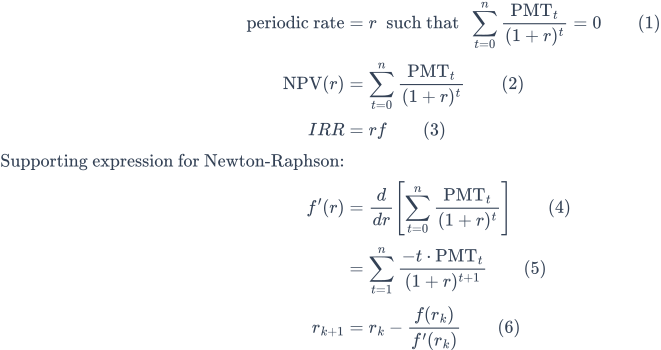
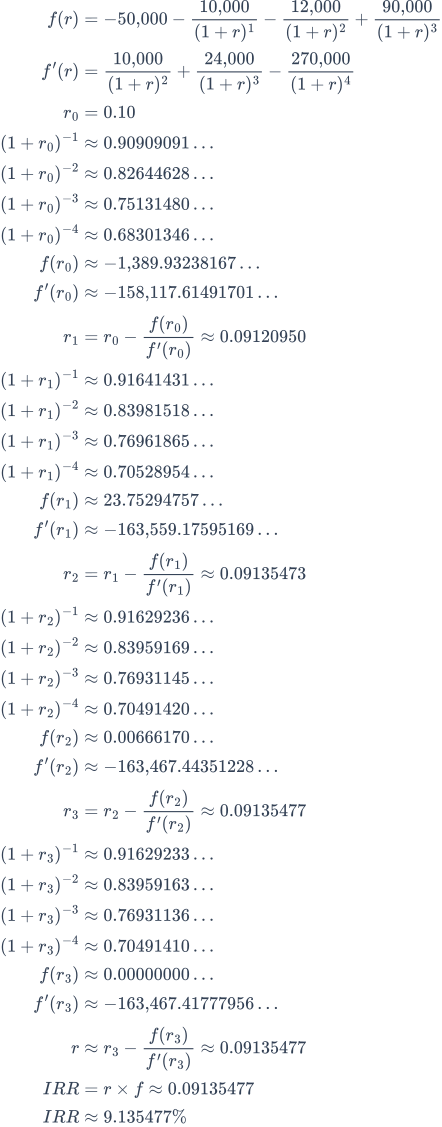
Fig. 2—Step-by-step solution of the IRR equation.
Variables: PMT0 = −50,000; PMT1 = −10,000; PMT2 = −12,000; PMT3 = 90,000; n = 3; f = 1.
Variable Definitions
- r
- Periodic rate of return. For example, per year when cash flows are annual.
- IRR
- Nominal annualized rate of return, computed as
IRR = r × f. - f
- Frequency (the number of periods per year). For annual spacing,
f = 1. - PMT
- Cash flow at period index
t. By convention, outflows are negative and inflows are positive. Values may differ across periods. - n
- Total number of periods after
t = 0. The summation fromt = 0tot = nincludes both the initial cash flow att = 0and the final cash flow att = n. - t
- Period index. An integer with
t = 0, 1, …, n, measured in equal time steps. (The calculator does not require cash flows to be equally spaced.)
- How do you calculate the IRR?
To calculate the Internal Rate of Return (IRR), solve for the interest rate that makes the Net Present Value (NPV) of a series of cash flows equal to zero. Because the IRR equation is nonlinear, it is usually solved using an iterative method such as Newton–Raphson.
Detailed Explanation
The IRR equation is nonlinear and cannot be solved algebraically. To find the rate r that makes NPV equal to zero, treat the problem as a root-finding problem. This means solving the following equation:
We want the value of r such that f(r) = 0. This calculator applies the Newton–Raphson method to find this value. The method starts with an initial estimate and refines that estimate using both the value and the slope (derivative) of the function at that point.
The slope is the derivative of f(r), denoted f’(r), which shows how sensitive the NPV is to changes in r. It is computed as:
The Newton–Raphson update formula is:
Each iteration produces a value that is closer to the IRR. This process is illustrated in Fig. 2, which shows the calculation using sample cash flows.
Calculation Steps Explained—Fig. 2.
- What is the IRR for the cash flows −50,000 (investment), −10,000, −12,000, +90,000 (returned), with each cash flow one year apart?
Solve for the periodic IRR by setting the Net Present Value (NPV) to zero and defining
f(r)as the sum of discounted cash flows andf’(r)as its derivative. Then apply Newton–Raphson updates (Equation (6)) untilf(r)converges to zero.- Define the NPV function
f(r)from Equation (2):f(r) = −50,000 − 10,000 ÷ (1 + r)^1 − 12,000 ÷ (1 + r)^2 + 90,000 ÷ (1 + r)^3 - Apply the general derivative rule (Equation (5)) to compute
f’(r):f’(r) = 10,000 ÷ (1 + r)^2 + 24,000 ÷ (1 + r)^3 − 270,000 ÷ (1 + r)^4(Each term follows the pattern−t × PMT_t ÷ (1 + r)^(t+1).) - Choose an initial guess for the periodic rate:
r₀ = 0.10. - Compute discount factors at
r₀(first iteration shown in full):(1 + r₀) = 1.10 (1 + r₀)^−1 = 1 ÷ 1.10 ≈ 0.90909091 (1 + r₀)^−2 = 1 ÷ (1.10)^2 ≈ 0.82644628 (1 + r₀)^−3 = 1 ÷ (1.10)^3 ≈ 0.75131480 (1 + r₀)^−4 = 1 ÷ (1.10)^4 ≈ 0.68301346 - Evaluate
f(r₀)using Equation (2):f(r₀) = −50,000 + [−10,000 × 0.90909091] + [−12,000 × 0.82644628] + [90,000 × 0.75131480] ≈ −50,000 − 9,090.90910 − 9,917.35536 + 67,618.33200 ≈ −1,389.93238167Result:
f(r₀) ≈ −1,389.93238167 - Evaluate
f’(r₀)using Equation (5) (term by term):- t = 1, PMT₁ = −10,000:
−1 × (−10,000) ÷ (1 + r₀)^2 = +10,000 × (1 + r₀)^−2 ≈ 10,000 × 0.82644628 - t = 2, PMT₂ = −12,000:
−2 × (−12,000) ÷ (1 + r₀)^3 = +24,000 × (1 + r₀)^−3 ≈ 24,000 × 0.75131480 - t = 3, PMT₃ = +90,000:
−3 × (+90,000) ÷ (1 + r₀)^4 = −270,000 × (1 + r₀)^−4 ≈ −270,000 × 0.68301346
Sum: 10,000×0.82644628 + 24,000×0.75131480 − 270,000×0.68301346 ≈ −158,117.61491701Result:
f’(r₀) ≈ −158,117.61491701 - t = 1, PMT₁ = −10,000:
- Apply the Newton–Raphson update (Equation (6)):
r₁ = r₀ − f(r₀) ÷ f’(r₀) = 0.10 − (−1,389.93238167) ÷ (−158,117.61491701) = 0.10 − 0.00879049676 ≈ 0.09120950 - Discount factors at
r₁(results only):(1 + r₁)^−1 ≈ 0.91641431(1 + r₁)^−2 ≈ 0.83981518(1 + r₁)^−3 ≈ 0.76961865(1 + r₁)^−4 ≈ 0.70528954 - Evaluate at
r₁(results only):f(r₁) ≈ 23.75294757f’(r₁) ≈ −163,559.17595169 - Update (results only):
r₂ = r₁ − f(r₁) ÷ f’(r₁) ≈ 0.09135473 - Discount factors at
r₂(results only):(1 + r₂)^−1 ≈ 0.91629236(1 + r₂)^−2 ≈ 0.83959169(1 + r₂)^−3 ≈ 0.76931145(1 + r₂)^−4 ≈ 0.70491420 - Evaluate at
r₂(results only):f(r₂) ≈ 0.00666170f’(r₂) ≈ −163,467.44351228 - Update (results only):
r₃ = r₂ − f(r₂) ÷ f’(r₂) ≈ 0.09135477 - Discount factors at
r₃(results only):(1 + r₃)^−1 ≈ 0.91629233(1 + r₃)^−2 ≈ 0.83959163(1 + r₃)^−3 ≈ 0.76931136(1 + r₃)^−4 ≈ 0.70491410 - Final convergence (results only):
f(r₃) ≈ 0.00000000f’(r₃) ≈ −163,467.41777956r ≈ r₃ − f(r₃) ÷ f’(r₃) ≈ 0.09135477 - Annualize using frequency
f = 1:IRR = r × f ≈ 0.09135477IRR ≈ 9.135477%
Thus, the periodic IRR is
r ≈ 0.09135477, and, with annual spacing (f = 1), the internal rate of return isR ≈ 9.135477%.- Define the NPV function
Notes:
- First iteration shown in full: Discount factors, function values, the derivative, and the update are expanded with explicit arithmetic. Later iterations show only results but follow the same structure.
f(rₖ)vs.f’(rₖ):f(rₖ)is the NPV at iterationk.f’(rₖ)is the slope (derivative) of the NPV with respect torat that iteration and appears in the denominator of the Newton–Raphson update (Equation (6)).- Stopping criterion: Iteration stops when
|f(rₖ)|is sufficiently close to zero so that another update would not materially changer.
Final Answer
The final answer (IRR) is approximately 9.135%.
Validate the calculator. Three-year internal rate of return calculation.
| Initial Investment: | −50,000.00 |
|---|---|
| Initial Investment Date: | |
| First Cash Flow Date: | |
| Cash Flow Frequency: | Annually |
| Discount Rate (optional): | 0.0% |
| No. | Date | Description | Amount |
|---|---|---|---|
| 1 | Additional investment | −10,000.00 | |
| 2 | Additional investment | −12,000.00 | |
| 3 | Investment return | 90,000.00 | |
| If any period includes February 29 (leap year), the result may differ slightly. | |||
Calculated result:
| Internal Rate of Return (IRR): | =9.135% |
|---|
Notes:
- This example uses the same calculation shown in Fig. 2.
- The calculator computes an Extended Internal Rate of Return (equivalent to a spreadsheet’s
XIRRfunction). Extended IRR offers greater flexibility and accuracy because cash flow entries use actual dates. A one-day difference can result in a slightly different (X)IRR.
IRR Calculator Help
The Internal Rate of Return (IRR) is the annualized rate of return on an investment, expressed as a percentage.
An investment may include a series of cash flows. There may be more than one investment (outflow) and more than one withdrawal or return (inflow). However, there must be at least one investment (outflow) and at least one return (inflow). Cash flows may occur on any date and for any amount.
It is essential to use the correct sign (positive or negative) for each cash flow. How do you determine the correct sign?
Use this rule: When you first invest, you make a payment or transfer funds. A payment decreases your account balance. Therefore, enter all investment cash flows, including the “Initial Investment,” as negative values.
When you receive money from the investment, you deposit it into your account. A deposit increases your account balance. Therefore, enter all investment returns, including the final liquidation value of your investment, as positive values.
The scheduled dates update each time you change the Cash Flow Frequency. The new dates are calculated based on the First Cash Flow Date. However, the Cash Flow Frequency setting does not by itself affect the IRR result. The calculator uses the Cash Flow Frequency only to create dates that match your expected investment cash flows. For example, if you usually make additional investments or withdrawals twice per year, set Cash Flow Frequency to Semiannually.
Michael says:
Hi. I am thinking of comparing projected returns from a potential investment versus keeping money in my bank account. Since the measure of return from my bank account over a specified time period can be thought of as a compound interest return, would it not make more sense to compare that to a potential investment’s projected compound interest return (as opposed to an IRR)?
When it comes to investments, it seems like IRR is everywhere, but compound interest return is not?…
Thank you for your thoughts.
Karl says:
The IRR is not a compounded rate. What an internal rate of return calculation is doing is normalizing investment cash flows so that they may be compared. You can use this IRR calculator to calculate the IRR for the bank account as well, and then compare it with the investment you are considering.
Note, whenever you are using an IRR to compare investments, make sure you use the same IRR calculator for the calculation. It’s possible that 2 different calculators could use different methods for their calculation and thus they would have slightly different results.
Does that answer your question?
bob crossman says:
So what I want to do is figure my annual rate of return but I will have a beginning date & investment amount, monthly/yearly cash flows, AND a final ending value on a certain date.
My use: I bought a property for $110,000 on 1/1/2016. I’ve had yrly cash flows of: 2016- $3765, 2017- $4451, 2018- 1484, 2019- $7553 and at the end of 2019 the property will be worth $198,400.
I thought your IRR would accomplish that but you have no place to put in an ending value and date.
What calculator do I need to do what I want? Do you have?
Thanks
Karl says:
Hi, you are using exactly the right calculator. If you are entering investments as negative values, then the final value is entered in the grid as a positive value as of the date required. That is, the final value is entered as a withdrawal from the investment as of the date you want the IRR even if the withdrawal isn’t actually made – but the value of the investment would be available to withdrawal should you so choose. Let me know if this isn’t clear.
Sahil says:
Hey Carl,
I am actually looking to replicate this calculator for my personal use. Do you mind sharing how did you go about in creating such a wonderful tool?
Thanks in anticipation!
Karl says:
How did I do it? Years of study. There’s no need to replicate this calculator. Just continue to use it. It’s not going anywhere!
Bob Schneider says:
Do you have a calculator that would factor in the tax bracket, depreciation, interest writeoff and operating losses on top of the usual income, expenses??
I’m looking for an after and before tax return
Karl says:
Nothing that handles all your requirements, I’m afraid.
This calculator will give you the bottom line,after tax, rate-of-return. However, as you can see, you would need to know the expenses (the tax amount, the depreciation etc) and enter them as expenses.
The MACRS depreciation calculator will calculate your depreciation expense which can be entered into this calculator.
The investment calculator will consider taxes (tax rate) but the cash flow needs to be regular.
Bob Schneider says:
This is for real estate development. I guess I could compute the yearly depreciation, operating losses & interest costs “below” the NOI as notes but there would be no computation of these on yield.
Karl says:
Sorry, I’m not following. I had understood that you wanted an IRR after these expenses? If that’s the case, then they have to be entered into the calculator.
Bob says:
So depreciation can be added as an expense? Like any other?
I also am looking to compute after tax yield upon sale.
Tkz
Karl says:
When calculating an annualized rate-of-return (which is what IRR is), everything boils down to a income or expense; a buy or sell; or a debit or credit.
So yes, you can enter depreciation as an expense. If you want an after tax rate-of-return, then you would include estimated taxes as an expense as well. And of course if you want to know the rate of return before taxes, you would not include the taxes as an expense.
As mentioned previously there is a depreciation calculator on this site what will calculate the depreciation amounts for each year that you can use in this calculator.
The key in getting an IRR that is meaningful for you is correctly including each item and not reversing amounts – negative when it should be positive or vice versa.
Bob Schneider says:
Karl-
Thanks for the input. I will continue to look.
Bob
Erik Graper says:
Great work on the calculators! Thanks for sharing the knowledge. Thank you!!
Linda says:
There is a red box on right side of screen “Would you like to be able to save your work, customize printed reports, export to Excel…..
When I click that box, I get a screen that has AccurateCalculators.com and your copyright. Should there be info on how to accomplish things in red box?
I am having difficulty saving the data. I can paste link into email but I would like to save it as a file so I can come back and add additional info.
Karl says:
Thank you for letting me know about the link in the red box being broken. It is supposed to take you to this page:
store – products
SolveIT! for Windows has an IRR calculator that let’s the user save to a file. Cost $69.95 per user.
However, would you like the free solution? You can use the custom URL, paste it to the browser address bar and then create a shortcut on your desktop.
see this page for details.
Or you can just copy/paste the custom URL into a text file (also on your desktop) and then use it to open the calculator later to reload your entries.
CA Subashree Hariharan says:
Thanks, very useful tool.
CA Subashree Hariharan
India
Karl says:
Thank you. Glad you found it useful.
EC says:
Karl
Can I use this to find the IRR for a lump sum pension versus monthly pension?
Karl says:
Yes, you can do that. Have you tried it, and had a problem getting a result? If so, tell me about what you are entering and I’ll try to provide some guidance.
Melanie says:
Which IRR calculator amongst these do you feel is the most applicable to use for the aforementioned lump sum versus monthly payout pension question?
Karl says:
You posted your question on the IRR calculator page. That’s the calculator I think will do what you need, though I’m not entirely clean on what you mean by “which IRR calculator” as this site only has one calculator identified or called IRR calculator.
So I’m a bit confused by your question. 🙂
Melanie says:
Thank you for your response. My apologies for the confusion.
Perhaps I should have phrased my question more as a comparison between the IRR versus the Retirement versus the Investment calculators, specifically when making an assessment to determine whether to take the present day lump sum of a pension versus the ongoing future monthly payments.
Thank you again.
Karl says:
Oh, I think I understand now. If you want to know which is more valuable to you, a lump sum now, or a stream of future payment, you need to use this present value calculator.
What you’ll do is compare the calculated present value to the lump sum promised. If the calculate PV is greater than the lump sum, then take the monthly payments. Take a look at the calculator, and if you have questions, just ask.
Kevin says:
Hi I am trying to determine whether making the investment is sound; a friend has asked for a loan of $20,000 at 10% annual interest for a $350,000 project contract that he has won. His TOTAL cost is going to $310,000 and hence he will be making $40,000. He will return the loan amount of $20,000 and 10% interest in 18 months. His project cash flow : cash in and cash out
Q1 ’20 cash in = $60,000
Q1 ‘ 20 cash out = 0
Q2 ‘ 20 cash in = $50,000
Q2 ‘ 20 cash out = $50,000
Q3 ‘ 20 cash in = $64,000
Q3 ‘ 20 cash out = $55,000
Q4 ‘ 20 cash in = $62,500
Q4 ‘ 20 cash out = 60,000
Q5 ’21 cash in = $77,000
Q5 ’21 cash out = $52,400
Q6 ’21 cash in = $99,400
Q6 ’21 cash out = $39,500
How would I use your calculator to determine the IRR and if I should be making this investment? Tried using the calculator but seem to not get a hang of it
Karl says:
Thanks for your question Kevin.
I’m not sure if I understand completely. Are you asking if your loan of $20,000 is a good investment? I what you describe as two different investments and thus 2 different IRRs are appropriate. First, your friend has an investment with is’s associated cash flows. Then your investment is the loan, with its cash flows.
So, for example, from your point of view, I suspect you want an IRR on the loan.
Your investment is the $20,000 loan. Enter that as the initial investment as a negative value. Then enter the payments you are scheduled to receive on the dates expected as positive values. Then calculate your IRR. Since this is an internal rate-of-return calculation, it does not mater what is interest or what the interest rate of the loan is. You just record the payments.
Does that help?