
Loan Calculator
How to Use the Loan Calculator

This loan calculator creates printable loan schedules with dates.
- Calculate unknown payment, term, interest rate, or loan amounts
- Saves to Excel & Word files.
- Print or export colorful charts
- Supports extra payments too!
Use this calculator to compute the loan payment amount.
- Click
Clear. Then enter values for:Loan AmountNumber of Payments(loan term)Annual Interest Rate
- Optionally, set the start date and end date.
- Leave
Loan Payment Amountset to0. - Click
CalcorPayment Schedule.
Leave the other settings unchanged unless you need to modify them.
This loan calculator also includes many features beyond basic payment calculations. See more details below…
The Calculator-Calculate Loan Amount, Rate, Term or Payment Amount
To set your preferred currency and date format, click the “$ : MM/DD/YYYY” link in the lower-right corner of any calculator.
Information
Operating Details
Always enter 0 for the unknown value, and enter 0 again after any change.
Note - You must enter 0 for the value you want the calculator to compute.
Why does the calculator not automatically recalculate the last unknown value?
The calculator is designed to generate a payment schedule that matches the loan terms you specify. This behavior is intentional. There is no single correct loan payment amount. A payment is valid as long as both the lender and the borrower agree to it. If the calculator always recalculated the last unknown value, you could not set a different payment amount by agreement.
About the loan origination date (start date) and the first payment due date
Important - The first loan payment period is rarely equal in length to the regular payment frequency. For example, if the schedule is monthly, the time from loan origination (when the borrower receives the funds) to the first payment due date is usually not exactly one month. The first period is often either longer or shorter.
A longer or shorter first period directly affects the interest calculation.
Very few online calculators handle this detail correctly. For accurate interest and payment results, you must be able to set the loan origination date and the first payment due date independently. You can do this on the Options tab.
Warning - Selecting dates may produce payment amounts and interest charges that do not match the results from other calculators.
This difference is intentional.
If you want results that match other calculators, set the Loan Date and First Payment Due so that the time between them equals one full payment period as defined in Payment Frequency. Example: If the Loan Date is May 15 and the Payment Frequency is Monthly, then set the First Payment Due to June 15. This will produce a conventional interest calculation.
See Long Period Options and Short Period Options below for additional details about payment amounts and interest calculations.
A simple approach - If you only need estimates and do not need precise results, you can leave the default dates that appear when the calculator loads.
More Than a Payment Calculator
The four required values
Loan Amount— the principal borrowed, not including interest.Number of Payments(term) — thePayment Frequencydetermines the loan term. For a five-year loan with monthly payments, enter60for the number of payments (60 months = 5 years).Annual Interest Rate— the nominal annual interest rate. (If a lender quotes anything other than an annual rate, you should consider not accepting that loan.)Payment Amount— the amount due on each payment date.
Set one of the above values to 0 if it is unknown.
How much can I borrow?
- Set the loan amount to
0. - Enter the number of payments.
- Enter the annual interest rate.
- Enter the desired or expected payment amount.
- Click
Calc.
How long will it take to pay off a loan?
- Enter the loan amount.
- Set the number of payments to
0. - Enter the annual interest rate.
- Enter the desired or expected payment amount.
- Click
Calc.
What interest rate allows me to pay $350 per month?
- Enter the loan amount.
- Enter the number of payments.
- Set the annual interest rate to
0. - Enter
$350for the payment amount. - Click
Calc.
Three loan options you usually do not need to change
Payment Frequency— how often payments are scheduled. The calculator supports 11 options, including biweekly (every two weeks), monthly, and annually. Payment due dates are calculated from the first payment date.Compounding— in most cases, set the compounding frequency equal to the payment frequency. This produces periodic interest. SelectingExact/Simpleresults in exact-day simple interest.Amortization Method— leave this set toNormalunless you have a specific reason to change it. For a full explanation of available methods, see Nine Loan Amortization Methods
Results — Loan Summary

See the payment schedule for the total interest saved.
Total Interest— total interest paid over the loan term, assuming payments are made as scheduled.Total Prepaid Principal— the sum of all extra payments. The payment schedule also reports the interest saved.Total Principal & Interest— the loan amount plus interest. This is the total cost of the loan.
Eleven advanced loan options
Loan Date— the date funds are disbursed. For vehicle or home loans, this is the closing date.First Payment Due— for leases, this may be the same as the loan date. See “About the loan origination date (start date) and the first payment due date” above.Extra Payment Amount— enter the amount if you plan to make one or more extra payments.Extra Payments Start— enter the date when extra payments should begin. This does not have to match payment due dates. For example, if regular payments are due on the 1st, you could schedule extra payments on the 15th to align with your pay periods.Extra Payment Frequency— how often you plan to make extra payments. For example, annually when you receive a year-end bonus.Number of Extra Payments— enter any whole number. To continue extra payments until the loan is paid off, enterUfor “Unknown.”Days Per Year— choose 360 or 365. Also called the day-count convention, this affects interest calculations when compounding is based on days (daily, exact/simple, or continuous) or when an initial irregular period creates odd days.Rounding Options— because payment and interest amounts are rounded each period (e.g., 345.0457 becomes 345.05), most loan schedules require a final rounding adjustment to bring the balance to zero. The payment schedule includes a footnote showing the rounding amount.Long Period Options(odd-day interest) — controls how interest is shown when the first period is longer than the selected payment frequency.Short Period Options— controls how payments are adjusted when the first period is shorter than the selected payment frequency.Fiscal Year-End— defines the fiscal year for reporting totals. Use this if your fiscal year does not match the calendar year.
More details about odd-day and irregular-period interest settings

Loan Equations
This section documents the formulas that the calculator uses and shows the step-by-step process for solving them. Use the links below to go directly to a specific equation:
- Term equation
- Loan amount equation
- Annual interest rate equation
- Payment amount equation
- Amortization equation
Term Equation — Calculate the Number of Payments (N)
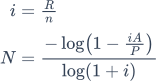
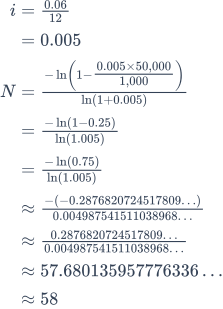
Fig. 2 – Step-by-step solution of the term equation.
Variables: A = 50,000; R = 6%; P = 1,000; n = 12.
Variable Definitions
- R
- Nominal annual interest rate (the quoted rate).
- n
- Number of compounding or payment periods per year.
- i
- Periodic interest rate.
- A
- Loan amount (principal).
- P
- Amount of each equal payment.
- N
- Total number of payments (loan term).
Calculation Steps Explained — Fig. 2
- How do you calculate the number of payments required to repay a loan?
To calculate the number of payments needed to repay a loan, apply the loan amortization formula using logarithms. This method assumes fixed periodic payments and a constant interest rate. The following example shows the process:
- Calculate the periodic interest rate by dividing the annual rate
R = 6%by the number of periods per yearn = 12:i = 0.005. - Substitute the values into the repayment formula:
N = -ln(1 - iA/P) ÷ ln(1 + i), whereA = 50,000,P = 1,000, andi = 0.005. - Evaluate the ratio:
iA/P = (0.005 × 50,000) ÷ 1,000 = 0.25. Thus,1 - 0.25 = 0.75. - Compute the natural logarithm:
ln(0.75) ≈ -0.2876820724…. Apply the negative sign:-ln(0.75) ≈ 0.2876820724…. - Evaluate the denominator:
ln(1.005) ≈ 0.0049875415…. - Divide the values:
N ≈ 0.2876820724… ÷ 0.0049875415… ≈ 57.6801…. - Round to the nearest whole payment period: N ≈ 58.
This means you must make 58 monthly payments of $1,000 to repay a $50,000 loan at a 6% annual interest rate, compounded monthly.
- Calculate the periodic interest rate by dividing the annual rate
Step-by-step Solution – Fig. 2
i = 0.06 ÷ 12 = 0.005N = -ln(1 - (0.005 × 50,000 ÷ 1,000)) ÷ ln(1.005)= -ln(1 - 0.25) ÷ ln(1.005)= -ln(0.75) ÷ ln(1.005)≈ -(-0.2876820724…) ÷ 0.0049875415…≈ 0.2876820724… ÷ 0.0049875415…≈ 57.6801…≈ 58
Final Answer
The final answer (N) is approximately 57.6801…. Because you cannot have a partial payment period, we round up to 58.
Validate the calculator. A $50,000 loan at a 6% annual rate with $1,000 monthly payments.
| Loan Amount: | 50,000.00 |
|---|---|
| Number of Payments (#): | = 58 |
| Annual Interest Rate: | 6.0% |
| Payment Amount: | 1,000.00 |
| Payment Frequency: | Monthly |
| Compounding: | Monthly |
| Amortization Method: | Normal |
Notes:
- This example uses the same calculation shown in Fig. 2.
- The equation assumes fixed payments and equal-length periods. If your result is different, confirm that the loan date and the first payment due date (on the
Optionstab) are exactly one month apart, and make sure that no extra payments are entered. - The equation provides a guideline. If you round down to 57 payments, the final payment will be larger than if you use a full 58-payment term.
Loan Amount Equation — Calculate the Amount You Can Borrow (PV)
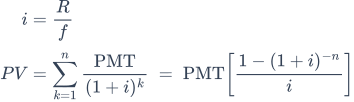
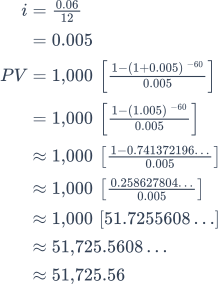
Fig. 4 – Step-by-step solution of the loan amount equation.
Variables: R = 6%; f = 12; n = 60; PMT = 1,000.
Variable Definitions
- R
- Nominal annual interest rate (the quoted annual rate).
- i
- Interest rate per period (
Rdivided byf). - f
- Number of payment periods per year.
- n
- Total number of payments for the loan or investment.
- PMT
- Amount of each equal periodic payment.
- PV
- Loan amount, or present value — the amount you can borrow.
Calculation Steps Explained — Fig. 4.
- How do you calculate how much you can borrow based on a fixed payment?
To determine how much you can borrow when the monthly payment, interest rate, and loan term are known, use the present value formula for an ordinary annuity. The steps using example values are as follows:
- Compute the periodic rate from the annual rate:
i = R ÷ f = 0.06 ÷ 12. - Evaluate the periodic rate:
i = 0.005. - Substitute into the formula:
PV = 1,000 × [(1 − (1 + 0.005)−60) ÷ 0.005]. - Simplify the base inside the exponent:
1 + 0.005 = 1.005. Result:PV = 1,000 × [(1 − (1.005)−60) ÷ 0.005]. - Evaluate the power term:
(1.005)−60 ≈ 0.741372196…. - Subtract from
1and divide by the rate:(1 − 0.741372196…) ≈ 0.258627804…, then divide by0.005. - Evaluate the bracketed factor:
≈ 51.7255608…. - Multiply by
1,000to obtain the unrounded present value:≈ 51,725.5608…. - Round to cents for currency reporting: PV ≈ 51,725.56.
This result means that a borrower making 60 monthly payments of $1,000 at a 6% annual interest rate, compounded monthly, can borrow approximately 51,725.56.
- Compute the periodic rate from the annual rate:
Step-by-step Solution – Fig. 4
i = 0.06 ÷ 12= 0.005PV = 1,000 × [(1 − (1 + 0.005)−60) ÷ 0.005]= 1,000 × [(1 − (1.005)−60) ÷ 0.005]≈ 1,000 × [(1 − 0.741372196…) ÷ 0.005]≈ 1,000 × [0.258627804… ÷ 0.005]≈ 1,000 × 51.7255608…≈ 51,725.5608…≈ 51,725.56
Final Answer
The final answer for the loan amount (PV) is approximately 51,725.56.
Validate the calculator. 60-month loan at 6% annual rate with $1,000 monthly payments.
| Loan Amount: | = 51,725.56 |
|---|---|
| Number of Payments (#): | 60 |
| Annual Interest Rate: | 6.0% |
| Payment Amount: | 1,000.00 |
| Payment Frequency: | Monthly |
| Compounding: | Monthly |
| Amortization Method: | Normal |
Notes:
- This example uses the same calculation shown in Fig. 4.
- The loan amount equation assumes that all periods are equal in length and that the payment amount remains fixed.
Annual Interest Rate Equation — Calculate the Loan Interest Rate (R)
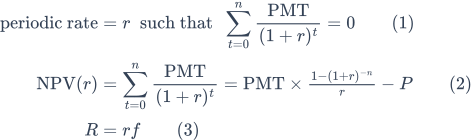
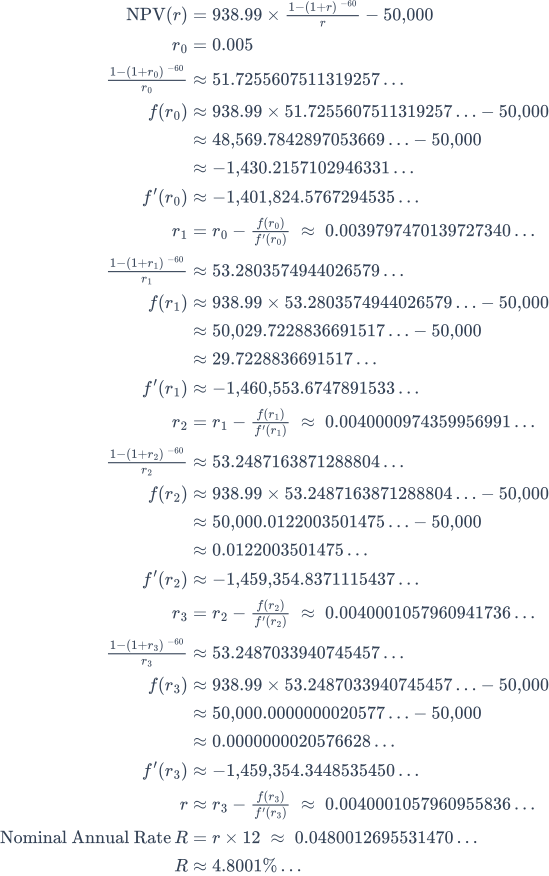
Fig. 6 – Step-by-step solution of the annual interest rate equation using an iterative numerical method.
Variables: PMT = 938.99; n = 60; P = 50,000; f = 12.
Variable Definitions
- PMT
- The fixed payment amount.
- n
- Total number of payments (loan term).
- P
- Loan principal (initial borrowed amount).
- f
- Number of payments per year (payment frequency).
- r
- Periodic interest rate (decimal form).
- R
- Nominal annual interest rate (percentage).
Calculation Steps Explained — Fig. 6
- How do you calculate the interest rate based on known payment and loan values?
To calculate the periodic interest rate from known loan terms, use the present value formula and apply an iterative method such as Newton–Raphson. This method refines the interest rate until the calculated loan amount matches the target. The example below shows the steps:
- Set up the net present value equation using the annuity factor:
NPV(r) = 938.99 × (1 − (1+r)−60)/r − 50,000. - Choose an initial guess for the rate:
r₀ = 0.005. - Evaluate the annuity factor at
r₀:((1 − (1+r₀)−60)/r₀) ≈ 51.7255607511…. - Form the residual at
r₀:f(r₀) ≈ 938.99 × 51.7255607511… − 50,000. - Compute:
≈ 48,569.7842897054… − 50,000. - Residual:
≈ −1,430.2157102946…. - Evaluate the derivative at
r₀:f′(r₀) ≈ −1,401,824.5767294535…. - Apply Newton’s update:
r₁ = r₀ − f(r₀)/f′(r₀) ≈ 0.0039797470…. - Evaluate the annuity factor at
r₁:((1 − (1+r₁)−60)/r₁) ≈ 53.2803574944…. - Residual:
f(r₁) ≈ 938.99 × 53.2803574944… − 50,000. - Compute:
≈ 50,029.7228836692… − 50,000. - Residual:
≈ 29.7228836692…. - Derivative:
f′(r₁) ≈ −1,460,553.6747891533…. - Next update:
r₂ = r₁ − f(r₁)/f′(r₁) ≈ 0.0040000974…. - Evaluate annuity factor at
r₂:((1 − (1+r₂)−60)/r₂) ≈ 53.2487163871…. - Residual:
f(r₂) ≈ 938.99 × 53.2487163871… − 50,000. - Compute:
≈ 50,000.0122003501… − 50,000. - Residual:
≈ 0.0122003501…. - Derivative:
f′(r₂) ≈ −1,459,354.8371115437…. - Next update:
r₃ = r₂ − f(r₂)/f′(r₂) ≈ 0.0040001058…. - Evaluate annuity factor at
r₃:((1 − (1+r₃)−60)/r₃) ≈ 53.2487033941…. - Residual:
f(r₃) ≈ 938.99 × 53.2487033941… − 50,000. - Compute:
≈ 50,000.00000000206… − 50,000. - Residual:
≈ 0.000000002058…. - Derivative:
f′(r₃) ≈ −1,459,354.3448535450…. - Final Newton correction:
r ≈ r₃ − f(r₃)/f′(r₃) ≈ 0.004000105796…. - Convert to nominal annual rate:
R = r × 12 ≈ 0.04800126955…. - Express as a percentage to four decimal places: R ≈ 4.8001%.
This result shows that the loan has a nominal annual interest rate of approximately 4.8001%, based on 60 monthly payments of $938.99 to repay $50,000.
- Set up the net present value equation using the annuity factor:
Step-by-step Solution – Fig. 6
NPV(r) = 938.99 × (1 − (1+r)−60)/r − 50,000r₀ = 0.005((1 − (1+r₀)−60)/r₀) ≈ 51.7255607511…f(r₀) ≈ 938.99 × 51.7255607511… − 50,000≈ 48,569.7842897054… − 50,000≈ −1,430.2157102946…f′(r₀) ≈ −1,401,824.5767294535…r₁ = r₀ − f(r₀)/f′(r₀) ≈ 0.0039797470…((1 − (1+r₁)−60)/r₁) ≈ 53.2803574944…f(r₁) ≈ 938.99 × 53.2803574944… − 50,000≈ 50,029.7228836692… − 50,000≈ 29.7228836692…f′(r₁) ≈ −1,460,553.6747891533…r₂ = r₁ − f(r₁)/f′(r₁) ≈ 0.0040000974…((1 − (1+r₂)−60)/r₂) ≈ 53.2487163871…f(r₂) ≈ 938.99 × 53.2487163871… − 50,000≈ 50,000.0122003501… − 50,000≈ 0.0122003501…f′(r₂) ≈ −1,459,354.8371115437…r₃ = r₂ − f(r₂)/f′(r₂) ≈ 0.0040001058…((1 − (1+r₃)−60)/r₃) ≈ 53.2487033941…f(r₃) ≈ 938.99 × 53.2487033941… − 50,000≈ 50,000.00000000206… − 50,000≈ 0.000000002058…f′(r₃) ≈ −1,459,354.3448535450…r ≈ r₃ − f(r₃)/f′(r₃) ≈ 0.004000105796…R = r × 12 × 100 ≈ 4.800126955…R ≈ 4.8001%
Final Answer
The final answer for the annual interest rate (R) is approximately 4.8001%.
Validate the calculator. A $50,000 loan with $938.99 monthly payments for a 60-month term.
| Loan Amount: | 50,000.00 |
|---|---|
| Number of Payments (#): | 60 |
| Annual Interest Rate: | = 4.8001% |
| Payment Amount: | 938.99 |
| Payment Frequency: | Monthly |
| Compounding: | Monthly |
| Amortization Method: | Normal |
Notes:
- Why an iterative method is required. There is no algebraic (closed-form) solution for the interest rate when the payment amount, term, and loan amount are known. The rate appears in both exponents and denominators, so it must be found using a numerical method that refines the estimate through repeated steps.
- Displayed values are shortened for clarity. To improve readability, decimal values shown in each step are shortened. However, all calculations use high-precision values. If you verify results independently, use at least 12 decimal places for the periodic rate and full calculator or software precision for intermediate steps (do not round between steps).
- How the rate is refined at each step. Each iteration uses the current estimate, the function value, and its slope (derivative) to compute a better estimate:
rk+1 = rk − f(rk) ÷ f′(rk). This continues until the estimate stabilizes. - The calculation uses the Newton–Raphson method, a standard numerical algorithm widely used in finance. It finds the periodic rate that sets the net present value (NPV) of cash flows to zero—the internal rate of return (IRR).
- You can verify the calculated interest rate by using it to recompute the payment or loan amount. If the recomputed value differs by no more than a few cents, the rate is considered accurate. Minor differences may occur because the displayed rate is rounded to four decimal places.
Payment Amount Equation — Calculate the Periodic Payment Amount
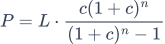
For step-by-step guidance on how to calculate the payment amount, seeAmortization Schedule — Payment Calculation Steps.
Amortization Equation — Calculate the Amortization Schedule
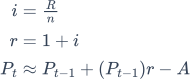
Under normal amortization, for any period: ending balance = beginning balance + periodic interest − payment.
For step-by-step guidance on how to calculate the amortization schedule, seeAmortization Schedule — Calculation Steps.
Conclusion
Over the years, I have consulted with users about a wide range of loan structures, including loans with uncommon features. Based on that experience, I am confident the calculators on this site can produce accurate schedules for virtually any structured settlement loan. If your loan includes special terms or constraints, feel free to ask for assistance.
Maher Hawash says:
Great work. I am trying to figure out why is there no difference in the calculated payment amount when I chose 360 vs 365 days per year when I request an Am schedule. I used $100,000, 6%, 36 periods and tried both 360 and 365 years options (clearing the payment amount to zero each time), and I am getting the same payment amount, and the same Am Schedule.
What am I missing
Karl says:
Thank you!
The days per year setting will impact the interest calculation if either (1) the compounding is set to daily or exact, or if there are odd initial days.
No doubt you have compounding set to a monthly or weekly option. In that case, the interest is calculated as some fraction of a year (monthly = 1/12 of a year). Days do not come into play. This means, for a $100,000, balance it doesn’t matter if the first month is February or March, the total interest accrued will be the same regardless of the number of days.
By "odd initial days", I mean that when the time between the loan date and first payment date is not equal to the payment frequency, then the odd day’s interest is also impacted by the setting.
Thomas says:
I like it , it is the only calculator I have found that lets me put in the payment amount and it figures how many payments.
Two comments tho :
When you finish putting in your information , it does not automatically go to the part to calculate, or whatever, Have to click on some orange bar and it brings up the things you can click on it to do , but it over writes other stuff on the page.
is there an IOS app for this ?
Karl says:
Hello Thomas, I’m glad you found the loan calculator useful.
As to the issue you mentioned, I assume you are using a cell phone? What you describe should not be happening. The calculator does not include an orange bar. I just started allowing ads to be displayed on this site this week. My guess is, you are seeing an ad or part of an ad covering up some critical part of the calculator. I’ll review the updated layout on a cell phone this weekend and ask that obstructing ads be removed.
No, there is no iOS version of the calculator. Normally, the web version should be as well laid out as a native iOS app.
By the way, if you are using an iPhone and need a printed loan scheduled and have a wireless printer within range, it’s possible to print directly from the phone. The technology for connecting to the printer works well. I’ve tried it with a few different models of iPhones. Thought I would mention it in case you’ve never tried it.
Ibrah says:
How does this loan calculator work ?
If i took a loan of $ 200,000 paid on monthly basis at a rate of 10% !
i.e Interest per month 0.10*200,000 = 20,000/mo.
but the calculator shows monthly interest contribution is $ 15,000.
How does this calculator work ?
Karl says:
The calculator requires you to enter an annual interest rate. Is the interest rate for this loan really 10% per month (very roughly about 120% per year)?
Also, the dates you enter and compounding frequency are important.
Ibrah says:
Yes, 120% per year.
Then why when calculating manually, the monthly interest is different ?
That’s 0.10*200,000 = 20,000per month ( manually ).
By calculator, it amounts to 15,000 monthly.
Karl says:
When the loan balance equals 200,000 and the loan date is May 1 and the first payment date is June 1, with a 120% annual interest rate, the first interest payment using this calculator is 20,000.
Grant Kincaid says:
Thank you! I have been looking for a complex Bi-weekly calculator that would tell me how much to pay to pay off a loan by giving a set amount of time (or bi-weekly payments). Many other calculators what to know my payment, loan dates, extra payment, blah blah blah.
Now I know how much to pay Bi-weekly to have my car loan paid off by January 2020!! This is perfect. Already bookmarked!
Karl says:
Great Grant! Glad you found it useful. Good luck in getting that car loan paid off.
Bobby says:
I’m trying to find the difference between a typical mortgage loan paid out monthly versus paid out weekly. I can’t enter number of payments as 1560 (52×30). Am I missing a step or something?
Karl says:
Wow, I wrote the first version of this calculator for the Apple IIe back in 1983 and I never had anyone ask for the ability to enter so many payments. As they say, there’s always something new. 🙂 This particular calculator is limited to 999 payments.
However, all is not loss. Please try this calculator. It should accommodate your needs. What you’ll do is make the first row a loan row. Then the 2nd row can be 999 weekly payments. Then follow that with a 3rd row for the balance of weekly payments with the date starting month after the 2nd row’s end date.
Gordon says:
Will this calculator allow for a fixed annual principal payment, plus the accrued interest for the year? It makes the total payment different each year, but the annual principal reduction payment is constant until the note is repaid.
Karl says:
Are the payments annual? Or are you saying, the interest is paid monthly and there’s one month that includes principal and interest? I’m not sure I understand your requirement. However, please try under "Amortization Method" the "Fixed Principal" option. You can then select annual payments and each year will be the same principal amount (Or if you meant monthly payments and the principal will add up to the same amount each year, then this option will work for that too.)
If that’s not what you want, please provide more details.
Monte Friedman says:
Hi Karl,
Thank you for this venue. I too am interested in comparing a weekly amortization schedule vs other intervals such as monthly… “IF” we have a Loan Amount of $100,000 at 4% interest on a 30 Year Term (amortization) the monthly Principal & Interest Payment is $477.42…. “IF” this Loan Originates 08/01/2019 in would terminate 07/31/2049…….. I am trying to see “IF” I am able to pay $110.175 Every Week, would that shorten the Term (length of time) that the Loan would be paid off.
Thank you again.
Karl says:
Thank you for your comment.
Without running the numbers, my guess is, there’s no savings. I think you would need to try weekly payments of $119.36 (monthly payment divided by 4). That should result in some savings since it ends up equivalent to 13 monthly payments in a year.
If you are interested in comparing monthly vs biweekly in one schedule, and reading more about this, you can try this biweekly payment calculator.
Gordon says:
Karl,
Thanks for your prompt reply.
The payments are annual and include a fixed principal payment plus the interest that has accrued during that year. Each subsequent year will have the same amount of principal payment, but the amount of interest accruing will be less each year as the principal declines.
Karl says:
You’re welcome.
Then this calculator should do exactly what you need. Set the amortization method to fixed principal and the payment frequency to annual.
Did you try that by any chance?
Disgruntled auditor working on a Sunday says:
Your website used to be phenomenal. I could just enter data and get the schedule I needed immediately. Now there’s so much fluff and crap all over the place that it’s almost more efficient to calculate it myself.
Please go back to the way it was. Nobody cares about the history of how the calculator came to be. We came here to get data.
Also, if you can just show the schedule instead of making us jump through hoops to get it, that’d be great.
Karl says:
Nothing has changed with respect to what a user must do to create a payment schedule in over 2 decades. Enter 3 known values, enter a 0 for an unknown value (i.e. loan amount, term, rate or payment amount) and then click on payment schedule button.
Done.
Ignore everything else or not – it’s up to you.
Sally Harding says:
How do I get and use this calculator?
Karl says:
What do you mean by "how do I get?" It’s right on this page for all to use.
There is a lot written here about how to use it. There’s no point in repeating it. If something is not clear, I’m happy to answer specific questions.
Trey Jones says:
People are asking how to use this and get it because it’s not here anymore. This page is blank except for comments.
Karl says:
Hello, AccurateCalculators.com is back up and running. I’m sorry for the problems you experienced. An automatically applied update went wrong and it eventually brought down the entier site on Tuesday. Unfortunately, I could not figure out the problem and get it fixed until late Tuesday (eastern time USA). Thank you for reporting the problem.
Karl says:
At the time you wrote, I had not been aware that the website had been automatically updated with a security fix. This "fix" broke some calculators when used from some locations as early as Sunday and eventually brought the entire website down on Tuesday morning eastern time (USA). I have fixed the problem, so if you still need a calculator for loan analysis, you should see it now on the page.