

All About Loan Amortization
What Is Loan Amortization?
Wikipediadescribes loan amortization as the process of repaying a loan over time with scheduled, regular payments. Each payment has two parts: one part covers interest that has accrued since the prior payment, and one part reduces the loan’s principal balance.
An amortization schedule is a report that shows how each payment is allocated between principal and interest. It also shows the remaining loan balance after each payment. A schedule can project future payments based on assumptions, or it can document an actual payment history.
This website provides calculators for projected and actual amortization schedules. The list of calculators appears in the left column of this page.
This page explains how amortization works, what to evaluate before borrowing, and which loan terms can reduce total repayment costs. The discussion is not limited to the interest rate.
Topics on this page. Select a link to view a section:
For accurate amortization calculations, a calculator must allow the user to set both the loan origination date and the first payment due date independently.
This feature is important for accuracy.
The time between when the loan originates (the “closing date”) and when the first payment is due is almost never equal to the selected payment frequency. For example, if payments are monthly, the first period will likely be slightly shorter or longer than one month. This difference is commonly called an odd-length first period or stub period.
Supporting odd-length first periods allows more accurate calculations. However, your results may differ from results produced by calculators that do not support this feature.
Long first period
A long first period occurs when the time between the loan date and the first payment date exceeds the chosen payment frequency. For example, the loan originates on May 16, and the first payment is due on July 1 (assuming monthly payments). Interest for the additional days can be handled in four different ways:

- None – no interest is charged for the extra days (this option is supported but is not typical in practice)
- With first – odd-day interest is added to the first payment, which will be higher than future payments
- With origination – odd-day interest is paid at loan origination (commonly called prepaid interest)
- Amortized – odd-day interest is spread evenly across all payments; the calculator increases each payment slightly

Short first period
A short first period occurs when the time between the loan date and the first payment is less than the selected payment frequency. This can be handled in three ways:
- No payment reduction – the calculator uses a full, standard payment amount for the first payment; the final payment is reduced to compensate
- Reduce first – the first payment is reduced to reflect the short period
- Reduce all – all payments are slightly reduced to compensate for the shorter first period

Here is a more formal definition of odd-day interest from the Financial Dictionary.
Another important point about dates:
By default, amortization schedules typically report annual totals as of December 31.
However, some taxpayers have different fiscal year-ends. A calculator designed for professional use should allow users to set year-end totals to any month of the year.

Many calculators on AccurateCalculators.com support stub periods and odd-day interest that result from long or short first periods.
Nine Loan Amortization Methods

Normal Loan Amortization
If you are unsure which option to select, use this method. In the U.S., most loans use the “normal” amortization method.
These are the defining features of a normal loan or mortgage:
- They have level payments; the scheduled payment amount remains the same for each period (except possibly for odd-day interest, as discussed above).
- The interest paid each period declines over time as the principal balance decreases.
- To keep payments level, the portion applied to principal increases with each installment.
- There may be a slight adjustment (“rounding”) on the final payment to reduce the balance to zero.
The following method is generally unfavorable for borrowers.
Rule-of-78s Payment Schedule
The Rule-of-78s method allocates more interest to early payments and less interest to later payments. The borrower therefore pays more interest at the beginning of the term and less toward the end, compared to a normal amortization schedule.
Both the total interest paid and the periodic payment amount are the same as with a “normal” loan. The difference is how each payment is allocated between interest and principal over time.
This article explains Rule-of-78s amortization in detail and describes why this structure is usually unfavorable for borrowers.
The next method produces the lowest periodic payment but has an important limitation.
Interest-Only Amortization
Some loans require the borrower to pay only the interest due each period. These are known as “interest-only loans.”
These are the typical characteristics of an interest-only loan or mortgage:
- The periodic payment amount generally remains the same.
- The interest amount remains constant because the loan balance does not decrease.
- The entire principal balance, plus interest for the final period, is due with the last payment.
Interest-only loans are used in many credit markets.
Many bonds sold to investors are structured as interest-only loans. Bond buyers lend money to the issuer, and the bonds pay a periodic coupon that represents interest only. According to the Securities Industry and Financial Markets Association (SIFMA), the U.S. bond market—excluding mortgage- and asset-backed securities—reached $47.4 trillion in Q1 2025, a 5.1% increase over the previous year.
This amount represents a large volume of debt financed with interest-only payments.
A bond issuer can create a bond coupon payment schedule using this site’s amortization calculator. Enter the “loan date” as the bond’s issuance date and the “first payment date” as the first coupon payment. Then select the “Interest-Only” amortization method.

No Interest Loan Amortization
This amortization method was first added to the Windows version of these calculators more than 20 years ago in response to a user request. A couple was lending money to their son and needed a payment schedule they could use without charging interest.
Many calculators on this site still support interest-free loans.
A common question is, “Why not simply enter a 0% interest rate?”
When a user enters “0” for any input, the calculator interprets it as an unknown value and attempts to solve for it. Entering 0% as the interest rate therefore causes the calculator to try to calculate the rate.
To avoid this, select the “No Interest” amortization method.

The next amortization method can reduce total interest cost if the borrower can afford the higher initial payments.
Fixed Principal Loan Table
Before digital tools were widely available, lenders often used the fixed principal amortization method because they could calculate it manually.
The payment is calculated by dividing the loan principal by the number of payments in the term and then adding the interest due for that period.
These are the characteristics of a fixed principal loan or mortgage:
- Payments start higher than with a “normal” loan.
- The payment amount declines over time as interest charges decrease with the loan balance.
- The principal portion of each payment is fixed. For example, with a $1,200 loan and a one-year term, the principal portion will always be $100 per month.
- The borrower pays less total interest.
- The final payment may include a rounding adjustment to reduce the balance to zero.
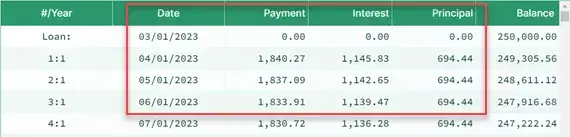
(Note the declining payment amount.)
Canadian Amortization Schedule
The Canadian amortization method is the same as the “normal amortization method” with one key difference: when selected, the calculator automatically sets the payment frequency to monthly and the compounding frequency to semiannual.
Typically, a conventional loan uses the same frequency for both payments and compounding.
Because the Canadian method compounds interest less frequently, it results in a slightly lower scheduled payment. The total interest accrued each period is somewhat less than with monthly compounding.
For additional background, see A Guide to Mortgage Interest Calculations in Canada.
Amortization with a Balloon Payment
Some loan terms require monthly payments based on a long amortization period—for example, 30 years—but the loan itself matures sooner, such as in five years.
In this situation, even after five years of regular payments, a significant balance remains. That balance, due in full at the end of the loan term, is the balloon payment.
This calculator can create an amortization schedule that includes a balloon payment.
- First:
- Enter the loan amount.
- Enter the annual interest rate.
- Enter the number of payments used to calculate the monthly payment—for example, 360 (30 years × 12 months).
- Enter “0” for the payment amount and click “Calc.” The calculator will solve for the monthly payment.
- Then:
- Change the number of payments to the actual loan term—for example, 60 for a five-year term.
- Click “Print Preview” to view the amortization schedule, including the balloon payment.

Loan Schedule with Points, Fees, and APR Support
Some loans require the borrower to pay an upfront charge called “points.”
A borrower pays points to obtain a lower interest rate.
When the borrower pays points, the lender reduces the loan’s interest rate. Points are essentially prepaid interest (and the IRS treats them that way). One point equals 1% of the loan amount—so one point on a $300,000 loan costs $3,000.
The calculator provides two ways to incorporate points into the amortization schedule. Click “Settings” and select “Points, Charges & APR Options.”
If “Include dollar value of points in interest charges” is checked, the calculator shows the points paid at origination and includes their cost in the total interest paid over the life of the loan.
If the box is unchecked, the dollar value of the points appears in the report header only and does not affect the interest totals.
For more details on how points work, see Moving.com’s explanation of mortgage loan points.
Points affect the loan’s APR. To calculate the APR, the calculator can include a Truth-in-Lending Act–compliant APR disclosure at the end of the schedule. Check the box for “Include Regulation ‘Z’ APR Disclosure calculation at the end of the schedule?” and enter any applicable fees in the “Other charges & fees (for APR calculation)?” field.

Negative Amortization Calculation
Some users report that they use this site’s calculator to compare their lender’s proposed payment amount.
Borrowers should understand that there is no single “correct” payment amount. The amount that matters is the amount agreed to by both the borrower and the lender. If the lender quotes $315 and the borrower expects $311, the difference is acceptable if both parties agree on how interest is calculated.
When the interest calculation is agreed upon, paying slightly more than expected may shorten the loan term or reduce the final payment. This can reduce total interest paid.
This relates directly to negative amortization.
If the agreed-upon payment is not large enough to cover the interest due, the loan will negatively amortize.
This amortization calculator allows you to enter any payment amount, including amounts that are too small to cover interest. If that happens, it will create a negative amortization schedule automatically.
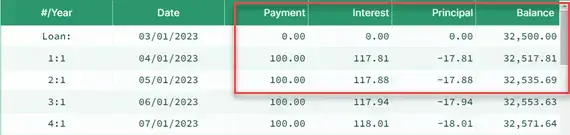
When the payment is less than the interest due, the unpaid interest is added to the loan balance, causing the balance to increase over time.
Negative amortization is not inherently problematic, but borrowers must be prepared to make a larger final payment that includes the accumulated unpaid interest.
If you are considering such a loan, review the final payment line in the schedule. That row shows the lump-sum final payment you will owe, including any unpaid interest.
See the negative principal entries in the example below.
Additional Topics and Feedback
You may request additional topics or more detail about amortization schedules.
This page explains many aspects of amortization schedules, but it cannot cover every possible situation.
Please use the comments section below to note any topics that are missing or unclear. You may also submit questions there. The site owner periodically reviews and responds to questions.
Melanie says:
I am trying to get an amortization schedule of a loan to my business. I am loaning it money and charging interest (as required by the IRS) but don’t expect a repayment to start for five years. I then will expect a standard loan- like a mortgage- with monthly payments. How do I input that 5 year no-payment time, while still charging interest as required?
Melanie says:
I sent a question but have since figured out the answer. Thank you for this excellent tool!
Karl says:
You’re welcome! I’m happy the site met your needs.
Rob says:
I am looking through your amortizations and need help. Looking for an amortization based on 360 days for commercial loan. Can you help direct me if you have one available?
Thanks
Rob
Karl says:
Do you just want to create amortization schedules? This loan calculator support 360 day years and will create an amortization schedule. See the options tab to set the days per year.
Stephen M Brennan says:
I have a $1.25M loan, 60 month term, 6.5% compounded daily, with a closing date of 12/12/19. First payment of P&I is not due until 2/1/10. Borrower will pay an additional $11,284.56 interest payment on 2/1/20 to cover the interest only period from 12/12/19 – 2/1/20. How do I set this up in your calculator so I can print out an amortization schedule?
Karl says:
What you have is what we call a long initial period – that is, the time between the loan origination and the first payment is longer than the scheduled payment frequency.
This calculator, and many on this site, give the user options for how to handle this scenario. It sounds as if you want the extra interest paid with the first payment. On the "Options" tab, select "With First", it that’s the case.
Note, the total amount will vary depending on how the days per year option is set and how the compounding frequency is set. I mention this because I’m not sure how you calculated $11,284.
Tammy says:
I have been asked to do an amortization schedule for a commercial property sold in June, 2001 & I am assuming the payments started the following month. According to several prior year tax returns, the beginning balance is $350,000 with commissions and expenses of sale of $5,771. On the tax returns that I have, 2014-2018, the interest amount paid each year is the same @ $22,579. The remaining principle balance at the end of 2018 is $223,770. Payment amount each month is $2,413.86. Is this the correct way to calculate this? Thanks for your help with this.
Karl says:
What are you trying to calculate? The current principal balance? Without knowing the terms of the loan and the payments paid, you can’t accurately calculate the balance due. What I find questionable is, since the principal amount is apparently declining, why is the interest amount the same each year. As a loan amortized, the interest amount declines each year, and the amount applied to principal increases.
Unless the monthly payment amount due is also decreasing. In that case, the terms are a fixed principal amount.
Bob Cranston says:
I have a commercial client who borrows money with a daily payment for five days a week. He borrows $40,000 on Monday, and his first payment is on Tuesday. But no payments are due on the weekends. So he has five payments a week. How can I calculate this? I’ve tried daily, but it gives me a 342% interest rate. Trying weekly gives me a 248% interest rate. I’ve tried compounding daily and weekly; that what gets me those interest rates. What other options are there?
Karl says:
Is it the nominal annual interest rate that you want to calculate?
This calculator should be able to do it (without knowing the payment amount). It will solve for the interest rate and it will also allow you to set up skipped payments – under "cash flow options."
If you try it, scroll down the page to the tutorials.
And once there, if you have any questions, just ask.
Harold says:
There is a type on this page “first payment is due on July 1st (ssuming”. Missing an “a” in assuming.
Karl says:
Thanks. Fixed. (Reread your first sentence. 🙂
Harold says:
I re-read my first sentence. Oops, I made a typo too!
Sandie says:
I have a loan with the following terms:
Loan amount 1,717,000
Annual Interest Rate 1%
Loan Origination Date 04/21/20
First payment due 03/21/21
accrued interest from 04/21/20-02/21/20 is paid at the end of the loan
14 monthly installments
Last payment on 04/21/20 to include interest from deferral period.
Payments (with the exception of the last one) are equal
Interest calculated on 360 year x number of days elapsed
Karl says:
Sorry Sandie, but I do not have a calculator that will handle deferred interest as you describe it. My guess, if one exists, it will be a feature of a loan servicer’s program that has an interest deferral feature.
Quintin says:
I have a borrower whose note is $59,500 for 15 years at 7%.
Payment is due on the 15th, but he pays on the 12th, 9th, 11th etc. How do I calculate those early payment credits in a chart that automatically adjusts each column?
Karl says:
You’ll need to use a different calculator. Please use this payoff calculator. It lets the user record the payments on the actual dates paid.
emmanuel says:
hello there!
i need assistance with this questions in loan amortization. my dad wants to borrow a business loan.
Supposing he borrowed $30, 000 and he has arranged for 9 year amortized loan with a monthly interest rate of 4%.
a) What will his monthly payment be? b) After 5 years, what will the balance be? c) How much interest will he have paid after the 5 years? d) What will be his total interest paid at the end of the 9 years?
Karl says:
Hi, this calculator will give you all the numbers you want. However, do you really mean the interest rate is 4% a month? If so, to use this calculator, you’ll need to convert the rate to an annual rate – 48%. Now answer the questions the calculator asks, and view the schedule using the "Print Preview" feature.
emmanuel says:
Thanks Karl!
when converting the monthly interest of 4% to an annual rate, is it -48% or just 48%???
Karl says:
You’re welcome. If the monthly interest rate is quoted as a positive value, then the annual rate would also be a positive value.